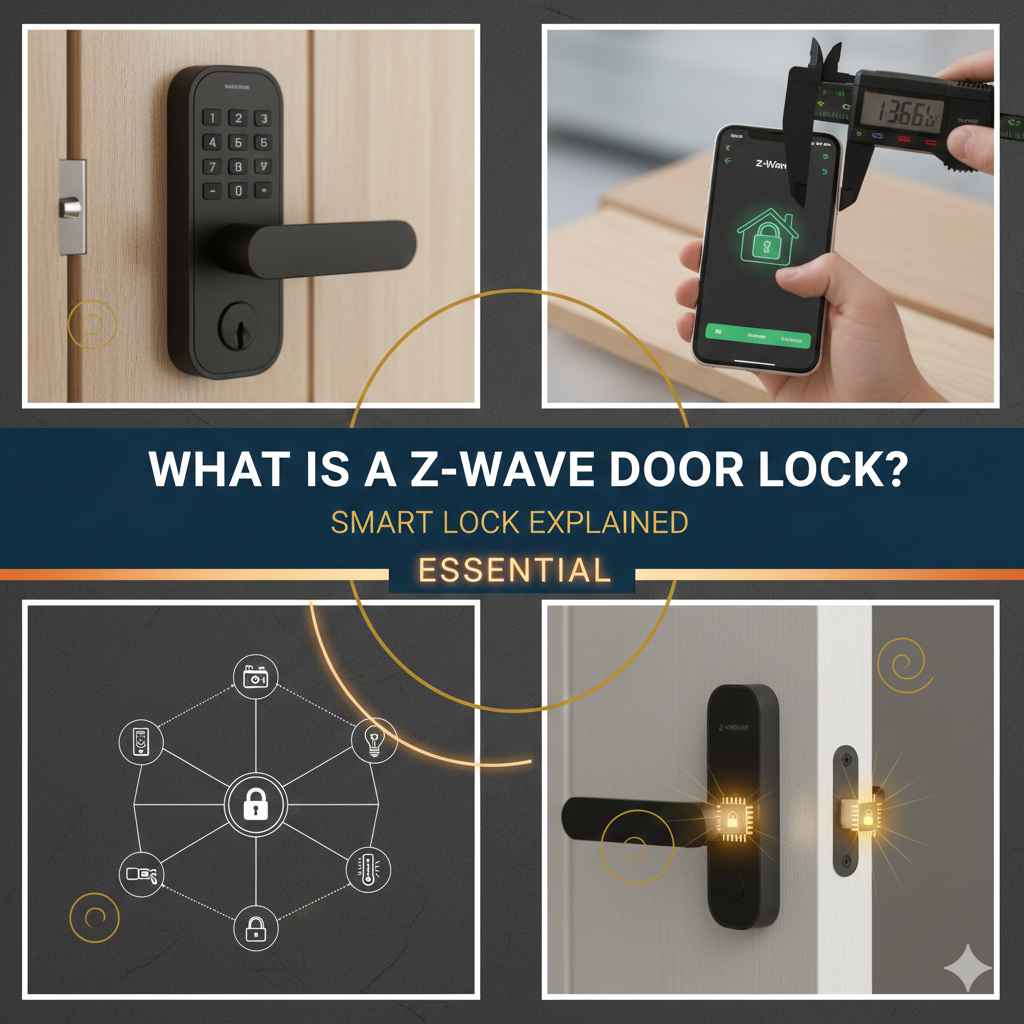
What Is a Z-Wave Door Lock? Smart Lock Explained
Wondering What Is a Z-Wave Door Lock? Smart Lock Explained might feel confusing at first. It’s a common question for anyone looking to make their home smarter and more secure. Don’t worry, it’s not as hard as it sounds! This post will break down everything you need to know about Z-Wave door locks, making it easy to see how they work and if they’re right for you. We’ll explore the basics step-by-step, making sure you feel confident by the end. Let’s get started!
Smart Home Security and Z-Wave Technology
Before exploring What Is a Z-Wave Door Lock? Smart Lock Explained, it’s important to grasp the basics of smart home security. Smart home security systems are designed to make your house safer and more convenient. They often involve things like smart locks, security cameras, and sensors. These tools let you monitor your house remotely and automate security tasks. Z-Wave is a special wireless technology frequently used in these systems. It’s built for low-energy use, making it perfect for devices like door locks that need to run on batteries.
This helps to connect all your smart home devices seamlessly, offering an integrated security system. These systems offer advantages such as improved safety, remote control capabilities, and easy integration with other smart home tools, making them a well-liked option for both homeowners and renters.
What is Z-Wave?
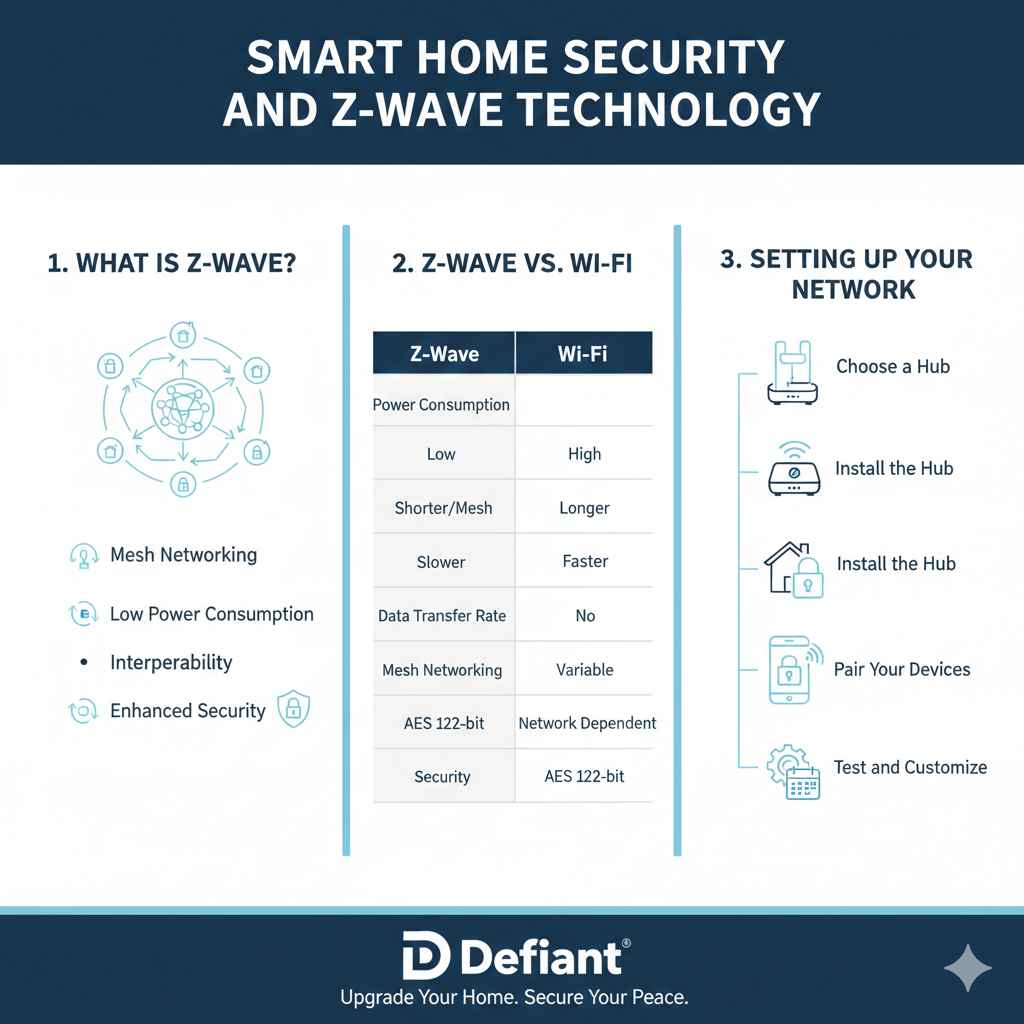
Z-Wave is a wireless communication protocol for home automation. Unlike Wi-Fi, which is commonly used for larger devices like computers, Z-Wave uses a different radio frequency. This frequency has a shorter range but uses very little power. This low power consumption is super important for devices that run on batteries, like door locks. Z-Wave devices create a mesh network. This means each device can communicate with others, extending the range of the network.
If a device is too far from the main hub, it can still connect by using other Z-Wave devices in between to relay the signal. This also helps make the system more reliable because if one device fails, the others can still communicate. This allows for a more connected and reliable smart home system.
- Mesh Networking: Z-Wave uses a mesh network, which means each device can communicate with other devices. This increases the range and reliability of the network. Imagine it like a chain of friends passing a message; the message can get to the end even if one friend is missing. This self-healing ability is a core feature of Z-Wave, making it a reliable solution for smart home setups.
- Low Power Consumption: Because Z-Wave is designed to use very little power, it is ideal for battery-operated devices. This means that a Z-Wave door lock can run for months, or even years, on a single set of batteries, compared to Wi-Fi door locks that need more frequent battery changes. This is a big plus for convenience.
- Interoperability: Z-Wave devices are designed to work together, regardless of the brand. This means you can mix and match devices from different manufacturers and they will still communicate. This open standard means that a Z-Wave door lock from one company will work with a Z-Wave hub from another company.
- Enhanced Security: Z-Wave uses advanced encryption to secure communications between devices. This is important for preventing unauthorized access to your home. Z-Wave’s security protocols, including AES 128-bit encryption, safeguard against potential threats, such as hacking attempts, ensuring that your home’s security remains a top priority.
The Advantages of Z-Wave over Wi-Fi
Z-Wave provides several benefits when compared to Wi-Fi, especially within a smart home context. Wi-Fi has a longer range and faster data transfer rates, making it suitable for streaming video or online gaming. However, Z-Wave’s strengths lie elsewhere. Its low power consumption extends battery life, which is essential for devices like door locks.
The mesh networking capabilities of Z-Wave mean a more reliable connection, even in larger homes, as the devices communicate with each other to extend the network’s reach. Moreover, Z-Wave’s interoperability and strong security measures make it a trustworthy option for smart home security. These factors make Z-Wave a good choice for devices that are important for security and convenience.
| Feature | Z-Wave | Wi-Fi |
|---|---|---|
| Power Consumption | Low | High |
| Range | Shorter (but mesh network extends range) | Longer |
| Data Transfer Rate | Slower | Faster |
| Mesh Networking | Yes | No |
| Interoperability | High | Variable |
| Security | AES 128-bit encryption | Dependent on network settings |
Setting Up Your Z-Wave Network
Setting up a Z-Wave network is usually simple. You’ll need a Z-Wave hub, which acts as the brain of your network. The hub connects to your home’s internet and allows you to control all your Z-Wave devices using a smartphone app or a web interface. The steps generally involve plugging in your hub, installing its associated app on your phone, and then “pairing” your devices with the hub. Pairing is the process of adding devices to your network; you’ll typically follow instructions specific to the device, often involving pressing a button on the device itself or entering a pairing code in the hub’s app.
Ensure the devices are within range of the hub, and consider the hub’s placement to optimize coverage throughout your home. Once the devices are paired, you can manage them via the app. This is where you set schedules, create scenes, and receive notifications.
- Choose a Hub: Select a Z-Wave-compatible hub. There are various brands and models available, ranging from simple units to comprehensive smart home control centers. Compatibility with your other smart home devices is a key factor.
- Install the Hub: Place the hub in a central spot in your home, near your router and within range of all your Z-Wave devices. Connect the hub to your home network using either an Ethernet cable or Wi-Fi, depending on the model.
- Pair Your Devices: Follow the manufacturer’s directions for pairing each Z-Wave device with the hub. This process generally involves putting the device into pairing mode and then adding it through the hub’s app or web interface.
- Test and Customize: After pairing, test each device to make certain it works as expected. Most hubs allow you to customize settings, set up schedules, and build automation routines for your smart devices.
Decoding Z-Wave Door Locks
A Z-Wave door lock is a smart lock that uses Z-Wave technology to communicate with your smart home system. It allows you to lock and unlock your door remotely, check the lock’s status, and create access codes for family members or guests. This combination of convenience and security makes Z-Wave door locks a popular option. They can also connect with other smart home devices. For example, when you unlock the door, the lights might automatically turn on. It combines the safety of traditional locks with the convenience of cutting-edge technology.
Key Functions of Z-Wave Door Locks
Z-Wave door locks offer multiple features that improve convenience and security. First, you can control your door from anywhere using your smartphone. This means you can lock or unlock your door remotely, so you never have to worry about forgetting your keys or letting someone in. They often allow you to create unique access codes. You can give these codes to family members, friends, or service providers, and you can easily change or delete the codes whenever you need to.
Many locks keep a log of who has entered your home and when. This can provide useful information for monitoring activity at your door. Z-Wave door locks can seamlessly integrate with other smart home devices. For example, the lights might automatically turn on when you unlock the door.
- Remote Control: The ability to control your door lock from your smartphone is a major advantage. This provides you the peace of mind of knowing you can lock your door even if you are away from home. You also have the convenience of letting people in without having to give them a key.
- Access Codes: You can create unique access codes for different people. This is helpful for managing guest access, and it also lets you avoid having to make copies of keys. Access codes are also useful for short-term situations, such as providing access to a contractor or cleaning service.
- Activity Logs: Most Z-Wave door locks keep a record of who has entered your home and when. This offers an extra layer of security. The log can provide information if there’s a problem. This feature can be valuable for monitoring your home’s activity and for resolving access issues.
- Integration with Smart Home Systems: Z-Wave door locks can connect with other smart home devices. You can set up automation rules so that, for example, the lights turn on automatically when you unlock the door. This integration creates a more connected and streamlined smart home experience.
Installation and Compatibility
Installing a Z-Wave door lock is usually straightforward and can be a DIY project for many homeowners. You’ll remove your old deadbolt and
- Door Compatibility: Check that the door lock suits the dimensions and material of your door. Some locks are designed for standard door sizes, while others may require special modifications. Measure your door’s thickness and make sure the lock fits.
- Z-Wave Hub Compatibility: Verify that the Z-Wave door lock is compatible with your Z-Wave hub or smart home control panel. Most Z-Wave devices are compatible with other Z-Wave devices, but it’s wise to double-check.
- Installation Process: The installation procedure generally involves removing your existing deadbolt and replacing it with the Z-Wave smart lock. Adhere to the manufacturer’s instructions, as these can vary slightly. Make sure the lock is correctly aligned, and test its functionality after installation.
- Power Source and Battery Life: Z-Wave door locks typically run on batteries. Choose a lock that uses common battery types for easy replacement. Evaluate the expected battery life of the lock, which can range from months to over a year, depending on usage.
Security and Safety with Z-Wave Door Locks
When you start to explore What Is a Z-Wave Door Lock? Smart Lock Explained, you will also consider their security features. Z-Wave door locks use multiple layers of protection to keep your home safe. They are usually equipped with encryption to secure communications between the lock and the hub. This encryption stops anyone from intercepting your signals. The best locks also have physical security features, like a sturdy deadbolt and tamper-resistant designs.
Some locks include features like auto-locking, which automatically locks the door after a set period. Others have a keypad that is resistant to fingerprints and smudges. They provide strong protection against unwanted access and make your home more secure. Regularly checking your lock’s settings and updating firmware is key to maintaining a high level of security.
Encryption and Communication Security
Encryption plays a critical role in the security of Z-Wave door locks. It transforms your data into an unreadable format, making it impossible for unauthorized people to decipher the information. Z-Wave door locks typically use Advanced Encryption Standard (AES) 128-bit encryption, a widely recognized standard known for its strong security. This encryption protects data when it is sent between your lock and the Z-Wave hub.
Communication is often secured between the hub and your smartphone as well, adding another layer of security. Regular updates to the firmware of your door lock are very important. They keep the encryption up-to-date, addressing any security vulnerabilities that might be discovered.
- AES 128-bit Encryption: Z-Wave door locks often utilize AES 128-bit encryption to protect communication between the lock and the hub. This strong encryption prevents unauthorized access and manipulation of the lock’s settings.
- Secure Communication Protocols: Secure communication protocols make sure that data transferred between the door lock, hub, and any connected devices or apps is protected. These protocols prevent “man-in-the-middle” attacks, which attempt to steal your data during transmission.
- Regular Firmware Updates: To maintain the security, update your door lock’s firmware often. These updates include security patches to address new threats. Manufacturers regularly release updates to fix any known vulnerabilities and improve the overall security of the device.
- Two-Factor Authentication: Some smart lock systems provide two-factor authentication (2FA) for added security. With 2FA, you need to provide a second form of verification (like a code sent to your phone) to verify your identity. This added layer of security provides greater peace of mind that only you or authorized individuals can control the lock.
Physical Security Considerations
Alongside digital security, the physical aspects of Z-Wave door locks are key. These aspects include the materials the lock is made of and design characteristics. A robust deadbolt that resists forced entry is important. Look for locks that are made of durable materials and that have features like anti-pick and anti-bump protection.
Some locks have a hidden keyway. They are designed to prevent tampering. Regular inspection of your door and lock is also helpful. Check the door frame, strike plate, and mounting screws to ensure everything is in good shape. Make sure your door and lock are set up properly for optimal security. This physical approach, combined with the lock’s digital security, creates a complete defense against unwanted entry.
- Durable Materials: Look for door locks constructed from sturdy materials. Common materials include solid steel and hardened alloys. These materials are difficult to break, offering strong resistance to physical attacks.
- Anti-Pick and Anti-Bump Features: Many smart locks feature anti-pick and anti-bump technology. This stops intruders from exploiting vulnerabilities. These features can stop common methods for bypassing traditional locks.
- Tamper-Resistant Design: A tamper-resistant design makes it difficult for someone to damage or disable the lock. This includes features like hidden screws and concealed keyways.
- Strike Plate and Door Frame: Ensure your strike plate and door frame are strong and well-secured. Reinforced strike plates and longer screws can make it more difficult for intruders to kick in your door.
Real-World Examples and Scenarios
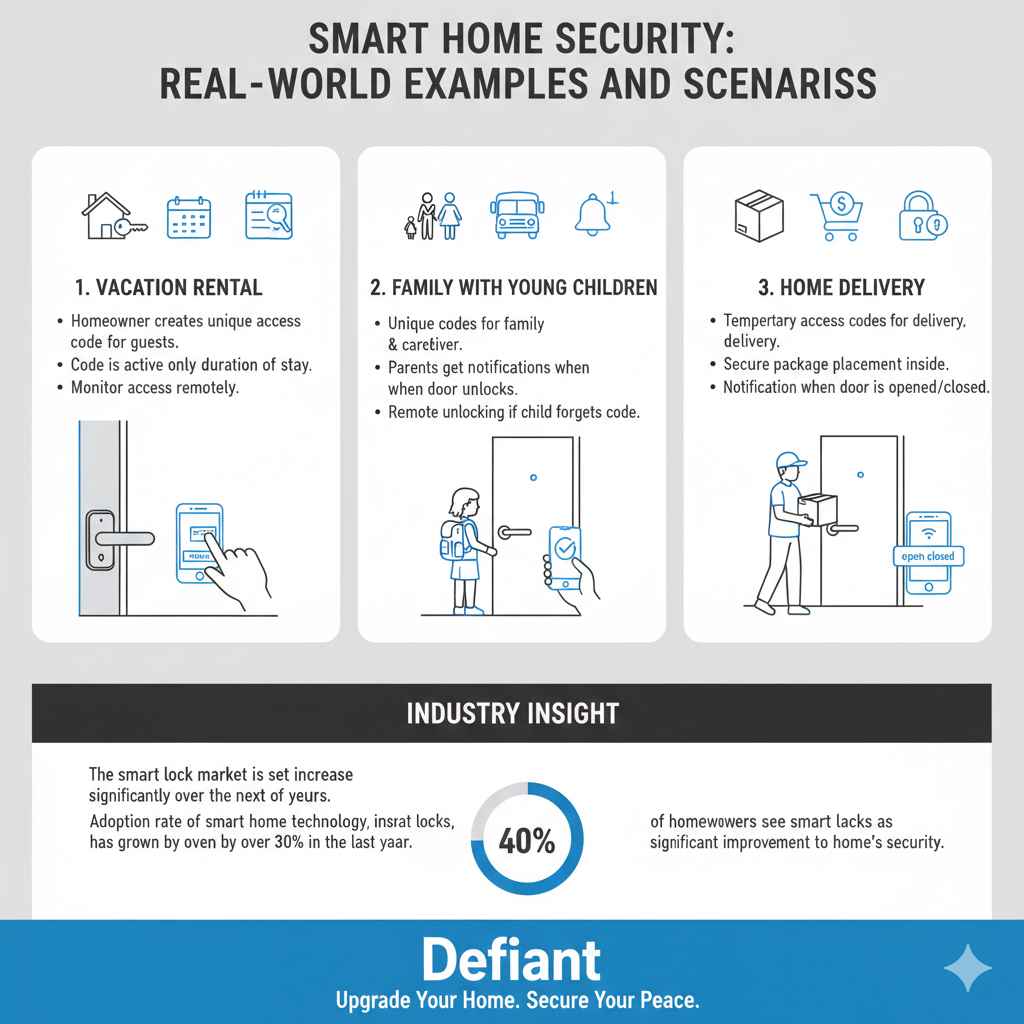
To grasp the usefulness of Z-Wave door locks, it’s beneficial to explore practical examples. These real-world situations demonstrate how Z-Wave door locks enhance security and convenience. Consider how a family uses a Z-Wave lock to provide access to a cleaning service. Or think about the ease of opening the door for guests who arrive early. These examples clearly illustrate the benefits of Z-Wave door locks.
- Vacation Rental:A homeowner has a vacation rental property and uses a Z-Wave door lock to manage guest access. When a guest books a stay, the homeowner creates a unique access code for the duration of the reservation. The code is only active during the guest’s stay, providing secure access and removing the need for physical keys. The homeowner can remotely monitor access logs to confirm arrivals and departures. This adds convenience for the guest, while also ensuring proper security of the rental property.
- Family with Young Children:A family with young children uses a Z-Wave door lock for ease of access and safety. The parents set up unique access codes for themselves and a trusted caregiver. The parents receive notifications every time the door is unlocked, letting them know when their children arrive home from school or when the caregiver has arrived. If a child forgets their code, the parent can easily unlock the door remotely. This streamlines daily tasks and helps the family stay connected and in control.
- Home Delivery:A homeowner frequently orders packages and groceries online. To ensure secure deliveries, they provide a temporary access code to trusted delivery personnel. The delivery person can use the code to enter the home, place the items inside, and then lock the door behind them. The homeowner receives a notification when the door is opened and closed. This prevents package theft and makes receiving deliveries simple, even when the homeowner is not available to receive them in person.
Statistics show that home security systems are rising in popularity. According to recent research, the smart lock market is set to increase significantly over the next few years. In one study, it was found that the adoption rate of smart home technology, including smart locks, has grown by over 30% in the last year. Another report indicates that over 40% of homeowners see smart locks as a significant improvement to their home’s security, proving they are a real benefit.
Frequently Asked Questions
Question: Are Z-Wave door locks difficult to install?
Answer: No, the installation process is generally straightforward and can be a DIY project. The locks are usually designed to replace existing deadbolts, and the manufacturer provides detailed instructions.
Question: How secure are Z-Wave door locks?
Answer: Z-Wave door locks are very secure. They use advanced encryption and secure communication protocols. They also come with physical security features, such as durable construction and tamper-resistant designs.
Question: Can Z-Wave door locks work without internet access?
Answer: They do not need an active internet connection to function. However, an internet connection is needed for remote control and to use features such as notifications and access log.
Question: What happens if the batteries die in a Z-Wave door lock?
Answer: Most Z-Wave door locks have a low-battery indicator to notify you when the batteries are low. Many models also have a backup key in case of a battery failure.
Question: Can I use a Z-Wave door lock with any smart home hub?
Answer: You can use a Z-Wave door lock if your smart home hub supports Z-Wave technology. Always verify compatibility before purchase.
Final Thoughts
So, What Is a Z-Wave Door Lock? Smart Lock Explained, and why should you consider one? Z-Wave door locks offer enhanced security, convenience, and peace of mind. They use Z-Wave technology to communicate with your smart home system, allowing for remote control, custom access codes, and activity monitoring. These locks stand out because of their mesh networking, low power consumption, and interoperability. When choosing a Z-Wave door lock, consider aspects such as the door type, hub compatibility, and security features. You can boost your home’s security and improve daily routines by using a smart lock. Don’t wait—begin exploring the world of Z-Wave door locks today. Take the first step toward a smarter, more secure home by researching available models and selecting the right one for your needs.