I Learned to Lock My LiftMaster Garage Door the Easy Way
I’ll never forget the time I left for a weekend trip and worried if my garage was secure. That’s when I learned how to lock my LiftMaster garage door. It’s super easy, and I’m excited to share my tips with you! This article will show you simple ways to lock your LiftMaster garage door, whether you use a manual lock, the lockout mode, or a smart lock. I’ll explain each step clearly, share handy tips, and help you avoid mistakes. Let’s make your garage safe and give you peace of mind!s
What Does Locking a LiftMaster Garage Door Mean?
Locking your LiftMaster garage door means keeping it secure so nobody can open it without permission. It protects your home, car, and stuff inside the garage.
Why It Matters
A locked garage door stops thieves and keeps your family safe. It also prevents accidental openings, like when kids play with remotes.
Different Ways to Lock Your LiftMaster Garage Door
You can lock your LiftMaster garage door in three main ways: manually, using the lockout mode, or with a smart lock. Each method is easy, and I’ll explain them all.
Manual Locking: The Simple Way
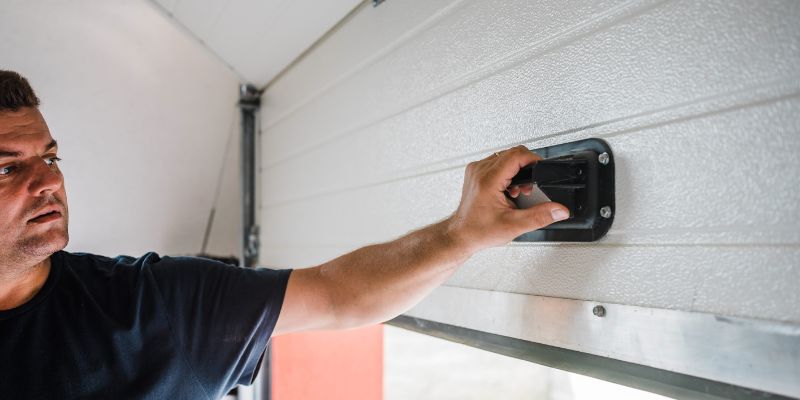
Manual locking uses a physical lock or bolt on your garage door. It’s great for extra security when you’re away.
Tools You Need
- A step stool (if you’re short).
- A manual lock or slide bolt (some LiftMaster doors have them built-in).
Steps to Lock Manually
- Go inside your garage.
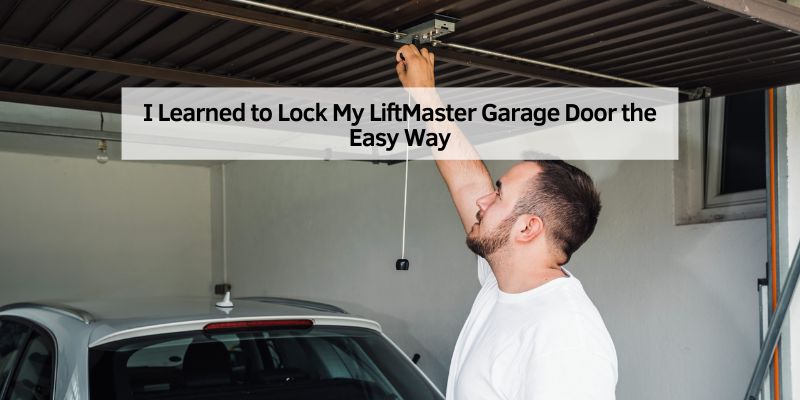
- Find the red handle on the opener’s track.
- Pull the handle down to disconnect the opener.
- Slide the manual bolt or lock into place.
- Check the door to make sure it’s locked.
Tip: Always test the door by trying to lift it. If it doesn’t move, you’re good!
Visual Idea
A diagram showing the red handle and slide bolt on a LiftMaster door would help beginners see where to pull and lock.
Using Lockout Mode: Block the Remote
Lockout mode stops your remote from opening the door. It’s perfect for vacations or nighttime security.
Tools You Need
- LiftMaster wall control panel (comes with your opener).
How to Lock with Lockout Mode
- Find the wall control panel inside your garage.
- Look for the “Lock” button (it might say “Vacation”).
- Press and hold the Lock button for 3 seconds.
- Check for a flashing green light on the panel.
- Test your remote—it shouldn’t work now.
Tip: If the light doesn’t flash, try a hard reset by unplugging the opener for 10 seconds, then plug it back in.
Visual Idea
A simple sketch of the wall control panel with the Lock button circled would make this step clear.
Smart Locks: High-Tech Security
A Yale | LiftMaster Smart Lock lets you lock your garage door with your phone. It’s super convenient and safe.
Tools You Need
- Yale | LiftMaster Smart Lock (sold by LiftMaster dealers).
- myQ app on your smartphone.
- Wi-Fi bridge (like the 821 LMC Smart Garage Control).
How to Set Up a Smart Lock
- Install the smart lock on your garage entry door (follow the manual).
- Download the myQ app from myQ’s website.
- Connect the lock to your Wi-Fi bridge using the app.
- Use the app to lock or unlock your door from anywhere.
- Set schedules to lock the door automatically at night.
bAlways check the battery in your smart lock. Low batteries can stop it from working.
Visual Idea
A phone screenshot showing the myQ app’s lock button would help readers understand the interface.
Table: Comparing Lock Methods
| Method | Cost | Ease of Use | Best For |
|---|---|---|---|
| Manual Lock | Free or $20 | Easy | Budget users |
| Lockout Mode | Free | Very Easy | Vacation security |
| Smart Lock | $150-$300 | Moderate | Tech-savvy users |
| Caption: This table compares the three ways to lock your LiftMaster garage door based on cost, ease, and best use. |
Benefits of Locking Your LiftMaster Garage Door
Locking your garage door keeps your home safe from break-ins. It also gives you peace of mind when you’re away.
Drawbacks to Watch For
Manual locks can be tricky if you’re short or the garage is cluttered. Smart locks cost more and need Wi-Fi to work.
Other Options to Consider
You can add a basic padlock to the door’s track for extra security. It’s cheap but takes a little effort to use.
My Top Tips for Locking Your Garage Door
I’ve locked my LiftMaster garage door for years, and here’s what I’ve learned:
- Check the door: Always try lifting it to make sure it’s locked.
- Use lockout mode at night: It’s quick and stops remote accidents.
- Keep your app updated: The myQ app works best with the latest version.
Common Mistakes to Avoid
- Forgetting to test the lock after setting it.
- Not checking smart lock batteries regularly.
- Pressing the Lock button too quickly (hold it for 3 seconds).
Table: Tools for Locking Your Garage Door
| Tool | Cost | Where to Buy |
|---|---|---|
| Step Stool | $15-$30 | Home Depot, Amazon |
| Slide Bolt | $10-$20 | LiftMaster |
| Yale Smart Lock | $150-$300 | LiftMaster dealers, Amazon |
| Caption: This table lists tools you might need to lock your LiftMaster garage door and where to find them. |
How to Lock LiftMaster Garage Door: My Story
Last summer, I went on a trip and forgot to lock my garage. I was so worried! That’s when I started using the myQ app. Now, I lock my door with my phone, and it’s so easy. Whether you use a manual lock, lockout mode, or a smart lock, locking your LiftMaster garage door is simple and keeps your home safe.
Table: Pros and Cons of Each Method
| Method | Pros | Cons |
|---|---|---|
| Manual Lock | Cheap, reliable | Needs physical effort |
| Lockout Mode | Free, quick | Only blocks remotes |
| Smart Lock | Phone control, schedules | Expensive, needs Wi-Fi |
| Caption: This table shows the pros and cons of each locking method to help you choose. |
Conclusion
Locking your LiftMaster garage door is easy and keeps your home safe. You can use a manual lock, lockout mode, or a smart lock with the myQ app. Each method is simple, and I shared my tips to make it even easier. Try locking your garage door today to feel secure. Have a fun idea or question? Share it in the comments below! Let’s keep our garages safe together.
Frequently Asked Questions
How do I know if my LiftMaster garage door is locked?
Try lifting the door by hand. If it doesn’t move, it’s locked. For smart locks, check the myQ app to see the lock status. Always test after locking to be sure.
Can I lock my LiftMaster garage door without a remote?
Yes! Use the wall control panel’s Lock button or a manual slide bolt. Press and hold the Lock button for 3 seconds until the green light flashes.
What is lockout mode on a LiftMaster garage door?
Lockout mode stops your remote from opening the door. Press the Lock button on the wall panel for 3 seconds. It’s great for vacations or extra security.
Do I need a smart lock for my LiftMaster garage door?
No, you don’t need a smart lock. Manual locks or lockout mode work well and cost less. Smart locks are great for phone control and schedules.
Why won’t my LiftMaster lockout mode work?
The green light might flash, but remotes still work if the opener needs a reset. Unplug the opener for 10 seconds, then try again. Check the manual for your model.
Can I use a padlock to lock my LiftMaster garage door?
Yes, you can add a padlock to the door’s track for extra security. It’s cheap but takes effort to lock and unlock each time.
How do I unlock my LiftMaster garage door?
For manual locks, slide the bolt back. For lockout mode, press the Lock button until the light stops flashing. For smart locks, use the myQ app to unlock.