How to Lock Your Garage Door With MyQ App
Many people wonder how to lock their garage door using the MyQ app. It seems like it should be simple, but sometimes technology can feel a bit tricky at first. You might wonder if you set it up right or if it’s really locked.
Don’t worry, this guide is here to help. We’ll walk you through it step by step, making it super easy. Soon you’ll be locking and unlocking your garage with confidence right from your phone.
Let’s get started!
Using the MyQ App For Garage Door Control
The MyQ app connects your garage door opener to your smartphone or tablet. This lets you check the status of your garage door from anywhere. You can see if it’s open or closed.
You can also open and close it remotely. This is super handy if you forget to close it or need to let someone in while you’re not home. Setting up this connection is the first step to mastering your smart garage.
What is MyQ Technology
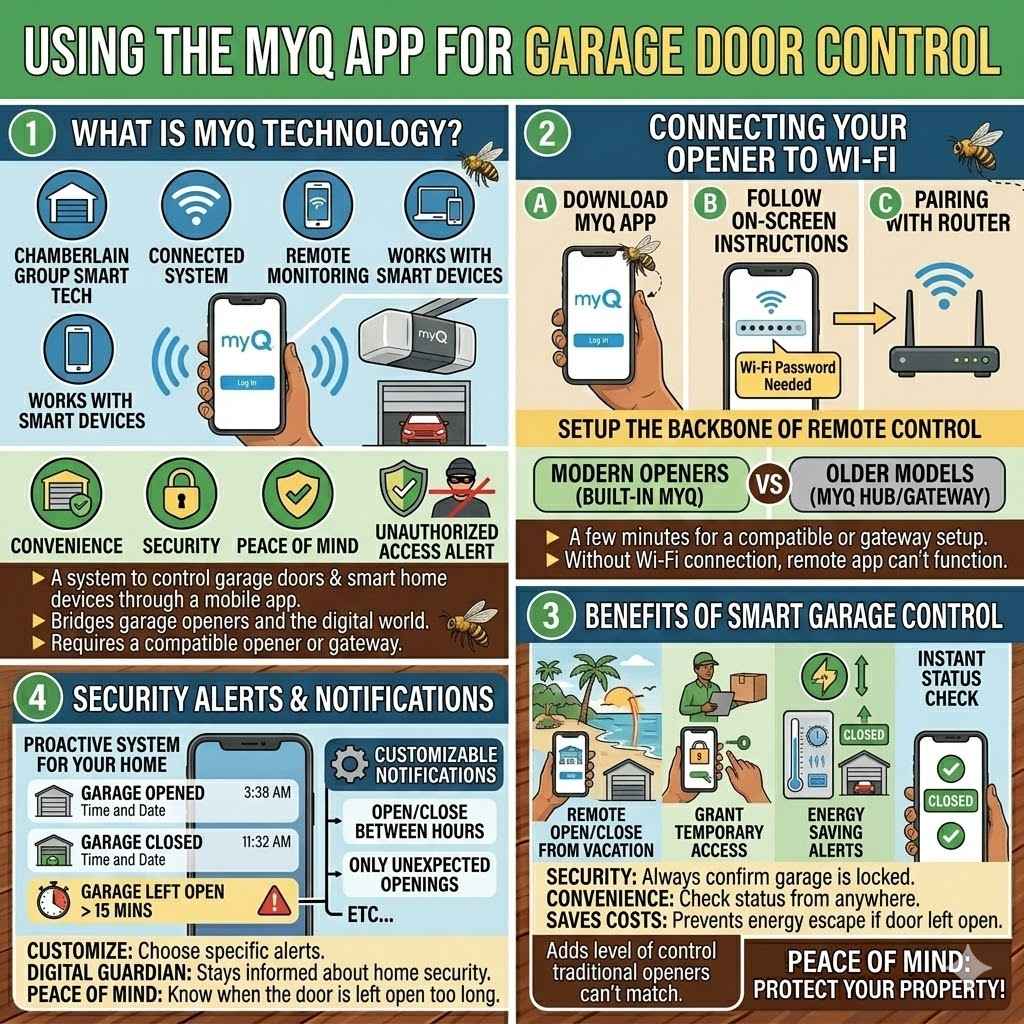
MyQ is a smart technology developed by Chamberlain Group. It allows you to monitor and control your garage door opener and other smart home devices through a mobile app. This system uses your home’s Wi-Fi network to communicate with your opener.
It’s designed to make your home more convenient and secure. MyQ also works with other smart devices, creating a connected home experience.
This technology bridges the gap between your existing garage door opener and the digital world. It requires a compatible garage door opener or a MyQ gateway device. Once installed, it gives you peace of mind.
You can check on your garage door from miles away. This makes it harder for unauthorized access to go unnoticed.
Connecting Your Garage Door Opener to Wi-Fi
Before you can use the MyQ app to lock your garage door, your opener needs to be connected to your home’s Wi-Fi network. This process usually involves downloading the MyQ app and following on-screen instructions. You’ll likely need your Wi-Fi password handy.
The app guides you through pairing the device with your router.
This connection is the backbone of remote control. Without it, the app can’t send signals to your opener. Most modern Chamberlain and LiftMaster garage door openers have built-in MyQ connectivity.
For older models, you might need a separate MyQ hub or gateway. This hub acts as a translator between your opener and your Wi-Fi. It’s a straightforward setup that takes just a few minutes.
Benefits of Smart Garage Door Control
Having smart control over your garage door offers many advantages. Security is a big one. You can always confirm your garage is locked.
This reduces the risk of break-ins. It also adds convenience. Imagine being on vacation and wondering if you closed the garage.
A quick check on the MyQ app solves that worry instantly. You can even close it remotely if you forgot.
Another benefit is the ability to grant temporary access. You can allow a delivery person or a family member to open the garage without needing to be there. You can also receive alerts if the garage door is left open for too long.
This helps save energy costs by preventing your heating or cooling from escaping. It provides a level of control and awareness that traditional openers simply cannot match.
Security Alerts and Notifications
The MyQ app can send you alerts directly to your phone. You’ll get a notification if the garage door opens or closes. This is helpful if someone uses your garage unexpectedly.
You can also set up alerts for when the door has been left open for a certain period. This proactive system helps you stay informed about your home’s security.
These alerts are customizable. You can choose which notifications you want to receive. This prevents your phone from being flooded with messages.
For example, you might only want alerts when the door is opened between certain hours. This feature provides a digital guardian for your garage. It offers peace of mind, especially when you’re away from home for extended periods.
How to Lock a Garage Door With the MyQ App
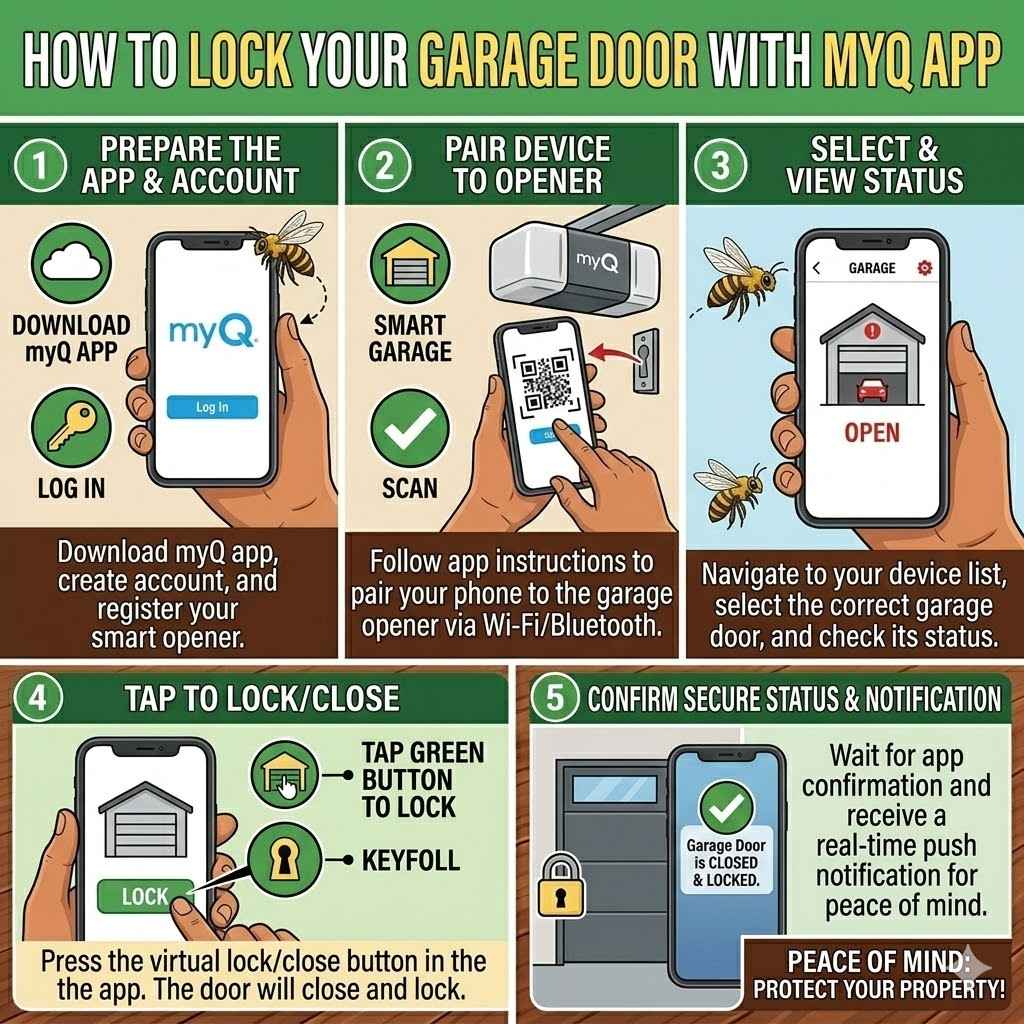
The core function of the MyQ app is to provide remote control over your garage door. This includes locking it. For most users, this is as simple as opening the app and tapping a button.
The app visually represents your garage door, and you can select an option to close or lock it. It’s designed to be intuitive, even for those new to smart home technology.
The process relies on your garage door opener being properly connected and functioning. Once connected, the app communicates wirelessly with the opener’s motor. This allows it to send commands.
The app’s interface usually features a clear icon for your garage door. Tapping this icon will bring up options like “Open,” “Close,” or “Lock.” This direct control makes managing your garage door access very straightforward.
Understanding the Lock Function
The “lock” function in the MyQ app is not always a separate button. For many modern garage door openers, closing the door automatically engages the lock mechanism. When you use the “Close” command in the app, the door moves down.
As it reaches the closed position, the opener’s internal lock engages. This is the same lock that engages when you press a wall button to close the door.
Some older systems might have a distinct lock feature. This could be a physical lock on the door itself or a special setting in the opener. However, the MyQ app typically mirrors the standard functionality of your existing opener.
If your opener has a secure close function that automatically locks, the app will enable that. It’s important to understand how your specific opener works.
Step-by-Step Guide to Locking Your Garage Door
First, ensure your MyQ app is open on your smartphone or tablet. Make sure your phone is connected to the internet, either through Wi-Fi or cellular data. Then, locate the icon or listing for your garage door within the app.
Tap on it. You should see options appear. If the door is currently open, select the “Close” option.
The door will begin to descend.
Once the garage door is fully closed, the MyQ system will automatically engage the locking mechanism. You will see the status in the app change to “Closed” and usually a lock icon will appear. If you wish to simply ensure it’s locked without closing it first (if it’s already closed), you might find a specific “Lock” button or the app might automatically lock it when it detects it is fully closed and hasn’t been commanded open.
To confirm it’s locked, check the status indicator in the MyQ app. It should show the door as closed and locked. Many users find it helpful to perform a manual test occasionally.
Open the garage door using the app, then close it. Verify that the lock engages as it reaches the bottom. This builds confidence in the system’s reliability.
Troubleshooting Common Locking Issues
Sometimes, the app might show the door as closed, but it’s not actually locked. This can happen if the opener’s internal lock mechanism is obstructed or malfunctioning. Check the track and the opener unit for any physical blockages.
Ensure the door slides smoothly without resistance.
Another common issue is a weak Wi-Fi signal. If the connection is unstable, commands might not be received correctly. Try moving your Wi-Fi router closer to the garage opener or consider a Wi-Fi extender.
Also, make sure your MyQ app is updated to the latest version. Software glitches can sometimes cause unexpected behavior.
When the Lock Doesn’t Engage
If the lock simply doesn’t engage when you close the door via the app, it’s often a mechanical or electrical problem with the opener itself. The trolley or drive mechanism that moves the door might have a sensor that tells the opener it’s fully closed. If this sensor is faulty, the opener might not know to engage the lock.
You might need to consult your garage door opener’s manual. Look for troubleshooting steps related to the locking mechanism or the “secure close” feature. If you can’t resolve it, it might be time to contact a garage door technician.
They can diagnose and repair issues with the opener’s internal components. Remember, safety is paramount when dealing with garage door mechanics.
Using the MyQ App for Remote Access
Beyond just locking and unlocking, the MyQ app enhances convenience significantly. Imagine you’re at work and your child forgot their school books. You can use the app to open the garage door for them remotely.
They can grab their books and leave, and you can close and lock the door again from your phone, all without leaving your desk.
This remote access feature is also useful for service providers. If you need a plumber or electrician to enter your garage, you can grant them temporary access. You can open the door for them and then close it once they are finished.
This eliminates the need to leave keys under the mat or coordinate schedules in person. It’s a modern solution for managing home access.
Granting Access to Others
The MyQ app allows you to grant access to other users. You can invite family members to download the app and link their accounts to your garage door opener. This means they can also control the door using their own devices.
You can set different permission levels for different users. For instance, a guest might only have temporary access.
This shared access feature is secure. Each user has their own login credentials. You can also revoke access at any time.
This is a great way to manage who can enter your garage. For example, if a contractor has finished their work, you can simply disable their access from your app. This ensures you always have control over who enters your property.
Advanced Features of MyQ Garage Control
The MyQ ecosystem extends beyond simple open/close functions. It integrates with other smart home platforms, offering more advanced automation possibilities. You can link MyQ to voice assistants like Amazon Alexa or Google Assistant.
This allows for hands-free control of your garage door.
For instance, you could say, “Hey Google, open the garage door.” Or, “Alexa, is the garage door closed?” This adds a new layer of convenience. It’s especially useful when your hands are full. The integration with these platforms streamlines your smart home experience, making interactions more natural and efficient.
This makes managing your home feel more futuristic and simple.
Integration with Smart Home Ecosystems
MyQ’s ability to connect with other smart home devices is a key advantage. It works with platforms like Amazon Alexa, Google Assistant, and Apple HomeKit (through specific hubs like the MyQ Smart Garage Hub). This allows for cross-device automation.
You can create routines where opening the garage door also turns on your porch lights.
For example, you could set up a “Welcome Home” routine. When you command the garage door to open, your smart lights in the entryway could automatically illuminate. Conversely, when you close the garage, they could turn off.
This seamless integration creates a more responsive and automated home environment. It makes everyday tasks simpler and more convenient.
Voice Control for Garage Doors
Using voice commands to control your garage door is a popular feature. Once linked to a voice assistant, you can simply speak your command. “Open garage door” or “Close garage door” are common phrases.
Many systems now require a spoken PIN for security when opening the garage door via voice, adding an extra layer of protection.
This hands-free operation is incredibly convenient. Imagine pulling into your driveway on a dark, rainy night. You can simply say, “Open garage door,” and it will open without you having to fumble for your phone or press buttons.
This adds a touch of modern luxury to your daily routine. It’s a testament to how smart technology is making our lives easier.
Setting Up Schedules and Routines
The MyQ app allows you to set schedules for your garage door. You can program it to close automatically at a certain time each night. For example, you might want to ensure it’s always closed by 10 PM.
The app will execute this command without any manual intervention.
This scheduling feature is excellent for security and energy saving. It removes the possibility of accidentally leaving the garage door open overnight. You can also set up routines triggered by other events.
For example, when your smart home system detects you’ve arrived home, it could trigger the garage door to open. This automates entry and exit from your home.
Automated Closing and Security Protocols
Automated closing is a core security feature. You can set the garage door to close at a specific time, ensuring it’s always secured. This prevents accidental openings from being left unattended.
The app provides a log of all door activity, so you can review when it was opened and closed. This audit trail is invaluable for security.
For added security, MyQ often implements advanced protocols. When sending commands, data is encrypted. This protects your account and opener from unauthorized access.
The system is designed with multiple layers of security to ensure your home remains safe and protected. It’s about giving you control and confidence in your home’s security.
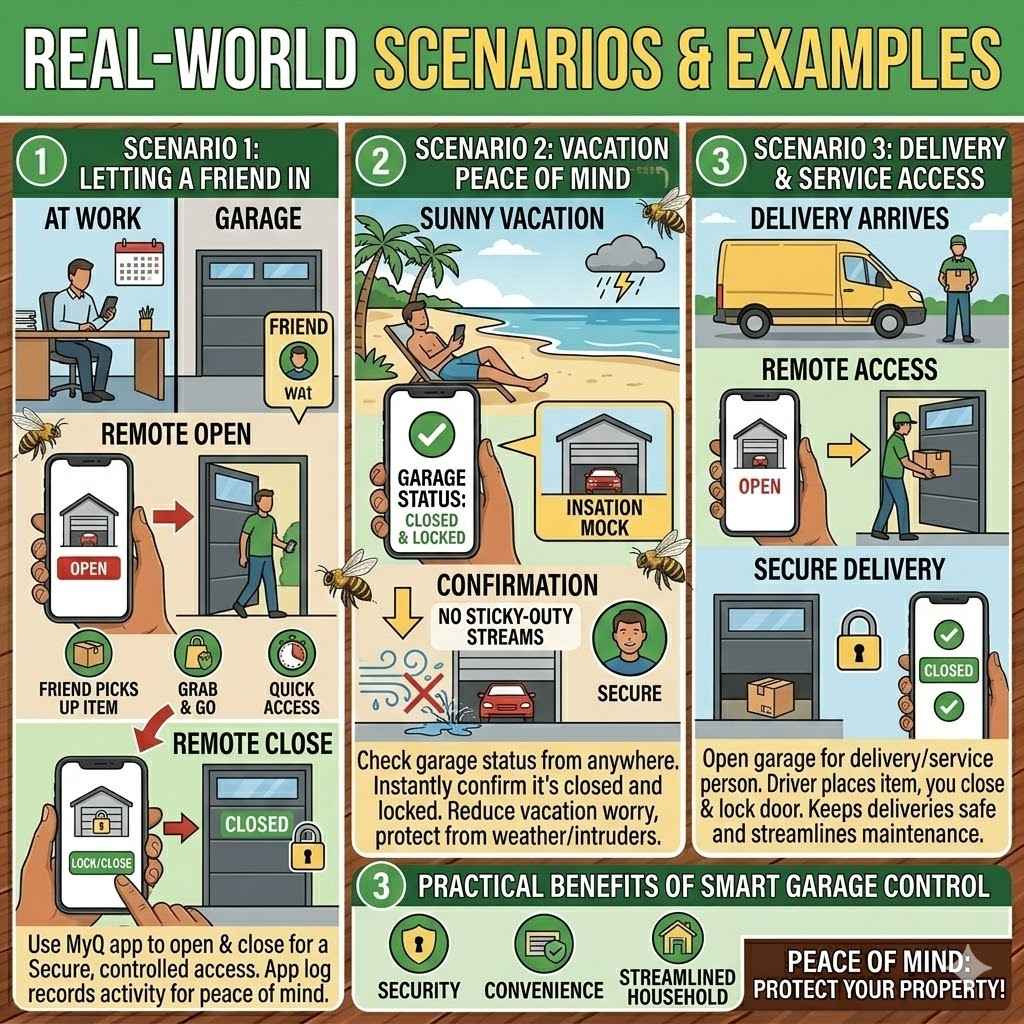
Real-World Scenarios and Examples
Let’s look at some situations where using the MyQ app to manage your garage door is helpful. Imagine you’re rushing out the door for work and you’re not sure if you closed the garage. A quick glance at your phone confirms it’s closed and locked.
If, by chance, it was open, you can close it instantly from your car. This saves a trip back home.
Another scenario: You’re expecting a package delivery. You can set up a temporary access code or open the garage door remotely when the delivery person arrives. You can then close it after they’ve left the package inside.
This keeps your packages safe and out of sight. These real-life examples highlight the practical benefits of smart garage control.
Scenario 1 Letting a Friend In
Your friend is coming over while you’re still at work. They need to pick something up from your garage. Instead of waiting for you to get home or giving them a physical key, you can use the MyQ app.
You open the garage door for them remotely. They quickly go in, grab what they need, and leave. You then close and lock the garage door from your phone.
This is incredibly convenient. It saves time for both you and your friend. It also means you don’t have to worry about someone being in your garage unsupervised for too long.
The app provides a clear record of when the door was opened and closed, so you know exactly what happened. This is a simple but powerful use of the technology.
Scenario 2 Vacation Peace of Mind
You’re on vacation and a storm is approaching. You start to worry if you closed the garage door properly before leaving. With the MyQ app, you can check the status instantly.
It shows the door is closed and locked. If, for some reason, it wasn’t, you can close it right away, protecting your home from the weather and potential intruders. This peace of mind is invaluable.
Many people find that vacation worry is significantly reduced by this capability. Knowing you can monitor and control your garage from anywhere is a major security and comfort benefit. You can relax and enjoy your trip, confident that your home is secure.
This feature alone makes the MyQ system a worthwhile investment for many homeowners.
Scenario 3 Delivery and Service Access
You’ve ordered something that needs to be delivered. Instead of leaving your door unlocked or leaving a key, you can use the MyQ app. When the delivery driver arrives, you can open the garage.
They place the item inside, and you close and lock the door. This keeps your deliveries safe and secure.
This is also useful for service technicians. If a repair person needs access to your garage for maintenance, you can let them in remotely. You can monitor their activity and close the door once they are done.
This provides secure, controlled access without you needing to be present. It streamlines many household tasks.
Frequently Asked Questions
Question: Do I need a special garage door opener for the MyQ app?
Answer: Not always. Many newer Chamberlain and LiftMaster garage door openers come with MyQ technology built-in. For older openers, you might need a MyQ gateway or hub device, sold separately, which connects your existing opener to your Wi-Fi network.
Question: How do I know if my garage door is actually locked after using the app?
Answer: The MyQ app will show the status of your garage door, typically as “Closed” and often with a lock icon once it has fully closed and the opener’s security mechanism has engaged. You can also test it manually by opening and closing the door using the app and confirming the lock engages.
Question: Can multiple people control the same garage door with the MyQ app?
Answer: Yes, you can invite other users to access your MyQ account. This allows family members or trusted individuals to control the garage door from their own devices, and you can manage their access permissions.
Question: What happens if my Wi-Fi goes out? Can I still use my garage door?
Answer: Yes, you can still operate your garage door manually using the traditional wall button or remote control even if your Wi-Fi is down. The MyQ app’s remote access features will be unavailable until your Wi-Fi connection is restored.
Question: Is it safe to open my garage door with my voice?
Answer: Many voice assistants require a voice PIN for security when opening a garage door. Always ensure you have a strong, unique PIN set up. While convenient, voice control should be used with awareness of security best practices.
Summary
You’ve learned how to easily lock your garage door using the MyQ app. It’s a simple process that brings big security and convenience benefits. Just open the app, tap close, and your garage is secured.
You can check its status anytime, from anywhere. This smart technology gives you control and peace of mind for your home.