How Much Space To Leave For Heat Distribution In Electrical Components?
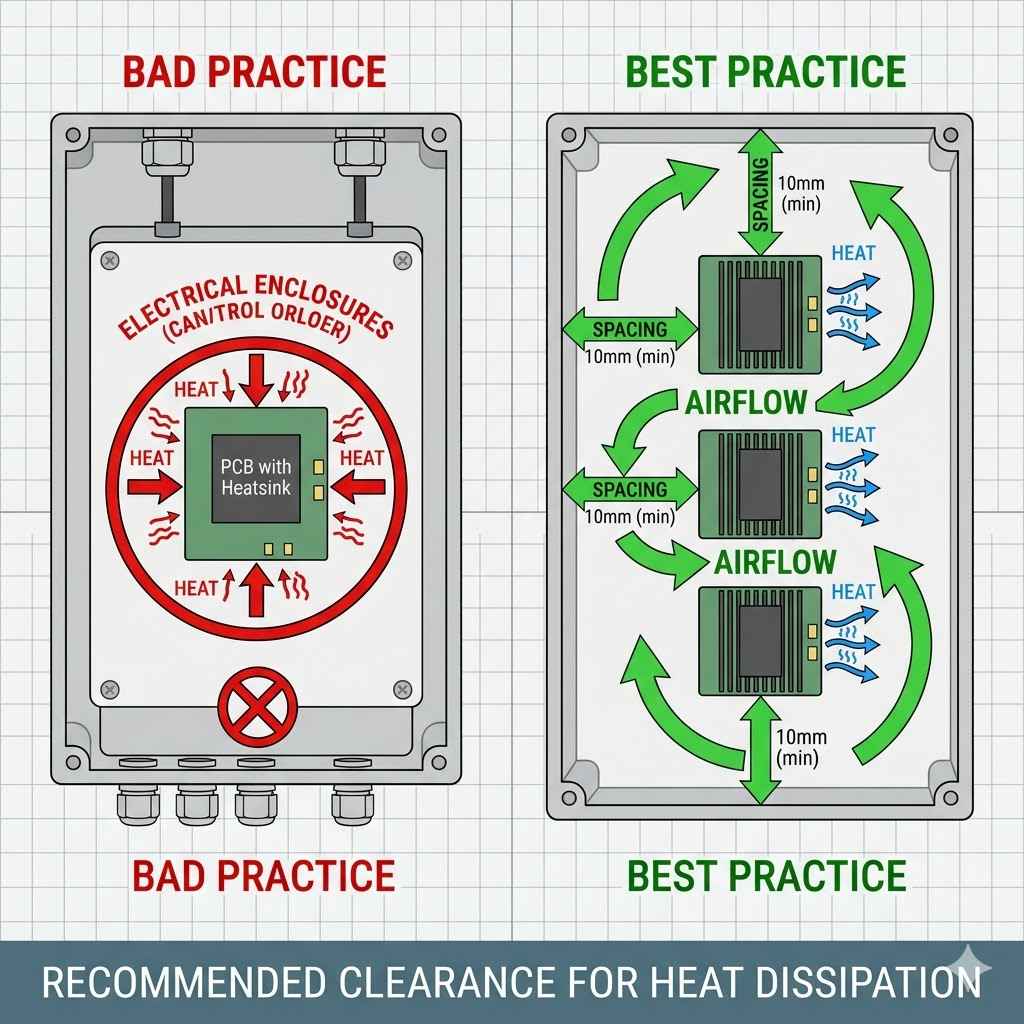
Understanding the right amount of space for heat distribution in electrical components is vital for safety and performance. It prevents overheating, reduces wear, and ensures your devices function reliably for longer periods, avoiding costly damage and potential fire hazards. This space allows air to flow and carry heat away.
Why Electrical Components Create Heat
Electrical components create heat because of something called electrical resistance. Think of electricity as water flowing through a pipe. The wires and parts are like pipes. When electricity flows, it pushes against the material it’s moving through. This push makes the material vibrate a little. These tiny vibrations are what we feel as heat.
This is a fundamental law of physics. It’s called Joule heating. The amount of heat made depends on how much electricity is flowing and how much resistance there is. More electricity means more heat. More resistance also means more heat. Some materials have more resistance than others.
Even in the best-designed systems, some heat is always created. It’s not a sign that something is broken. It’s just a side effect of electricity doing its job. The key is managing this heat. We need to let it go where it needs to go.
The Importance of Airflow and Space
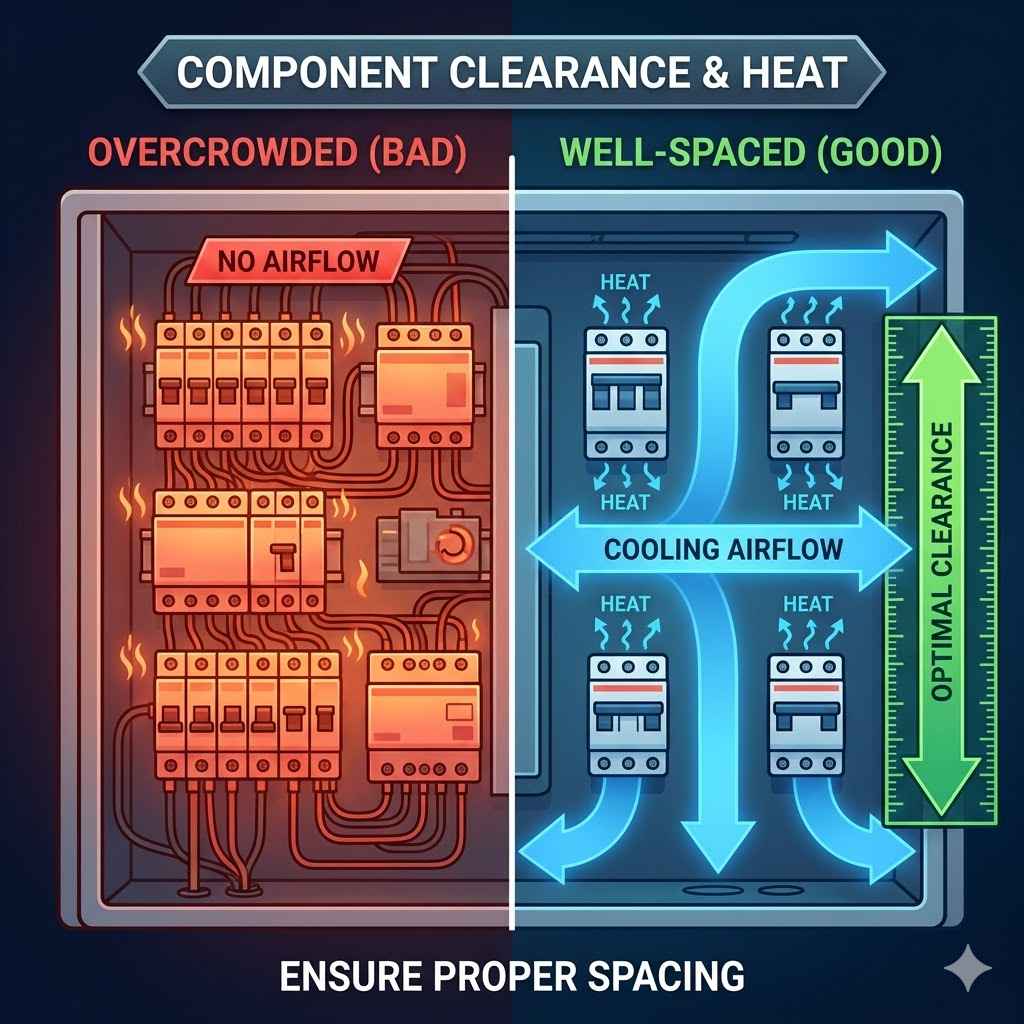
Airflow is like the circulation system for heat. When electrical parts get hot, the air around them also gets hot. This warm air then rises or moves away. Cooler air comes in to take its place. This continuous movement of air is called convection.
If there isn’t enough space, the warm air can’t move freely. It gets trapped. This makes the area around the components even hotter. The cooler air can’t get in easily. This is like trying to cool a room with the windows shut tight.
Leaving space allows for this natural cooling process. It creates pathways for the air to flow. This flow carries the heat away from the components. It keeps the temperature down to a safe level. This is crucial for the lifespan and safety of any electrical setup.
My Own Scare with Overheating Components
I remember a time when I was helping a friend set up a home theater system. He had this fancy new receiver, all sorts of wires, and a big TV. We were so excited to get it all working. We packed everything into a cabinet. It looked really neat and tidy.
We plugged everything in and it was amazing! The sound was great, the picture was sharp. But after maybe an hour of watching a movie, I started to smell something odd. It wasn’t burning, exactly, but it was warm and a bit plasticky. I felt the top of the receiver, and it was surprisingly hot.
My friend just shrugged and said, “Oh, that stuff gets warm.” But I had a bad feeling. We pulled the receiver out of the cabinet. The vents were totally blocked by the cabinet walls. There was barely a finger’s width of space. I could see dust had started to build up inside because the air wasn’t moving.
We moved the receiver so it had plenty of room around it. The smell went away, and the unit felt much cooler. It was a good lesson. Sometimes, neatness can get in the way of function and safety. We learned to prioritize space for air to flow. It was a little scary thinking about what could have happened.
Key Space Requirements for Common Components
General Rule: Aim for at least 1-3 inches of clearance around most components.
- AV Receivers: Need ample space, especially on top and sides for ventilation.
- Computers/Servers: Front and back intakes/exhausts need clear paths.
- Power Supplies: Often have fans and vents that must not be blocked.
- Routers/Modems: Can get surprisingly warm; allow some airflow.
Understanding Different Types of Components
Not all electrical parts create heat in the same way. Some are designed to run hotter than others. Others are very sensitive to heat. Knowing this helps us understand their needs for space.
For example, a simple light switch doesn’t create much heat. It just makes or breaks a connection. It usually doesn’t need much extra space around it. A small fan might be enough if it’s enclosed.
But a powerful amplifier or a computer’s main processor is very different. These parts work hard. They use a lot of electricity. They are designed to dissipate heat. They often have fans and heat sinks built-in. These are metal parts with fins to help cool them down. These components definitely need more room.
Power supplies are another big one. They convert electricity from one form to another. This process isn’t perfect. Some energy is lost as heat. A computer’s power supply, for instance, needs good airflow to keep its internal parts cool.
Heat Sinks and Fans: Nature’s Cooling Helpers
Many electrical components use special features to manage heat. You’ve probably seen them. Heat sinks are common. They are made of metal, usually aluminum or copper. They have many thin fins. These fins increase the surface area. More surface area means more contact with the air. This helps heat escape faster.
Fans are also used a lot. They actively push air across the hot components or heat sinks. This forces convection. It’s much more effective than just letting air move on its own. A computer fan is a good example. It blows air directly onto the processor and other parts.
When these components have heat sinks and fans, it’s a clear sign they need space. The fans need room to draw in cool air and blow out warm air. The heat sinks need air flowing over their fins. If you block these, the cooling system can’t do its job.
Why Blocking Vents is Dangerous
- Reduced Cooling: The primary function of vents is airflow. Blocking them stops this.
- Temperature Rise: Components get hotter than they should.
- Performance Issues: Electronics may slow down to protect themselves.
- Component Damage: Extreme heat can permanently break parts.
- Fire Hazard: In severe cases, overheating can lead to fires.
Understanding Ambient Temperature
The space around components isn’t just about direct airflow from them. It’s also about the temperature of the air around them. This is called ambient temperature. If the room itself is very hot, the components will have a harder time cooling down.
Think of it like trying to cool off in a sauna versus an air-conditioned room. The same effort feels different. If your room is already warm, the air coming in to cool your electronics is also warm. It can’t absorb as much heat.
This is why placing electronics in enclosed, unventilated spaces is a bad idea, especially in warmer climates. Basements can get humid and warm. Attics are often extremely hot. Garages can be stifling in summer. These places make cooling harder for all devices.
For sensitive equipment, like servers or high-end audio gear, controlling the ambient temperature is part of the setup. This might mean using fans in a cabinet or even air conditioning for a dedicated room.
Manufacturer Guidelines: Your Best Friend
The people who design and build electrical components know them best. They know how hot they get and how much cooling they need. That’s why manufacturers provide specific guidelines. These are usually found in the user manual.
These manuals often have diagrams. They show where vents are. They might tell you exactly how much space to leave around the device. They might even suggest the type of environment the device should be in.
Ignoring these guidelines is risky. The manufacturer has tested their product. They’ve figured out the safe operating conditions. If their manual says to leave six inches of space, there’s a good reason for it. It’s not just a suggestion.
For things like home appliances, computers, and audio-visual equipment, always check the manual. It’s your most reliable source of information. It’s designed to help you use the product safely and effectively.
Calculating Space: It’s Not an Exact Science, But There Are Principles
Figuring out the exact amount of space needed isn’t like doing a math problem with one right answer. It involves several factors. But we can use some common sense and expert advice.
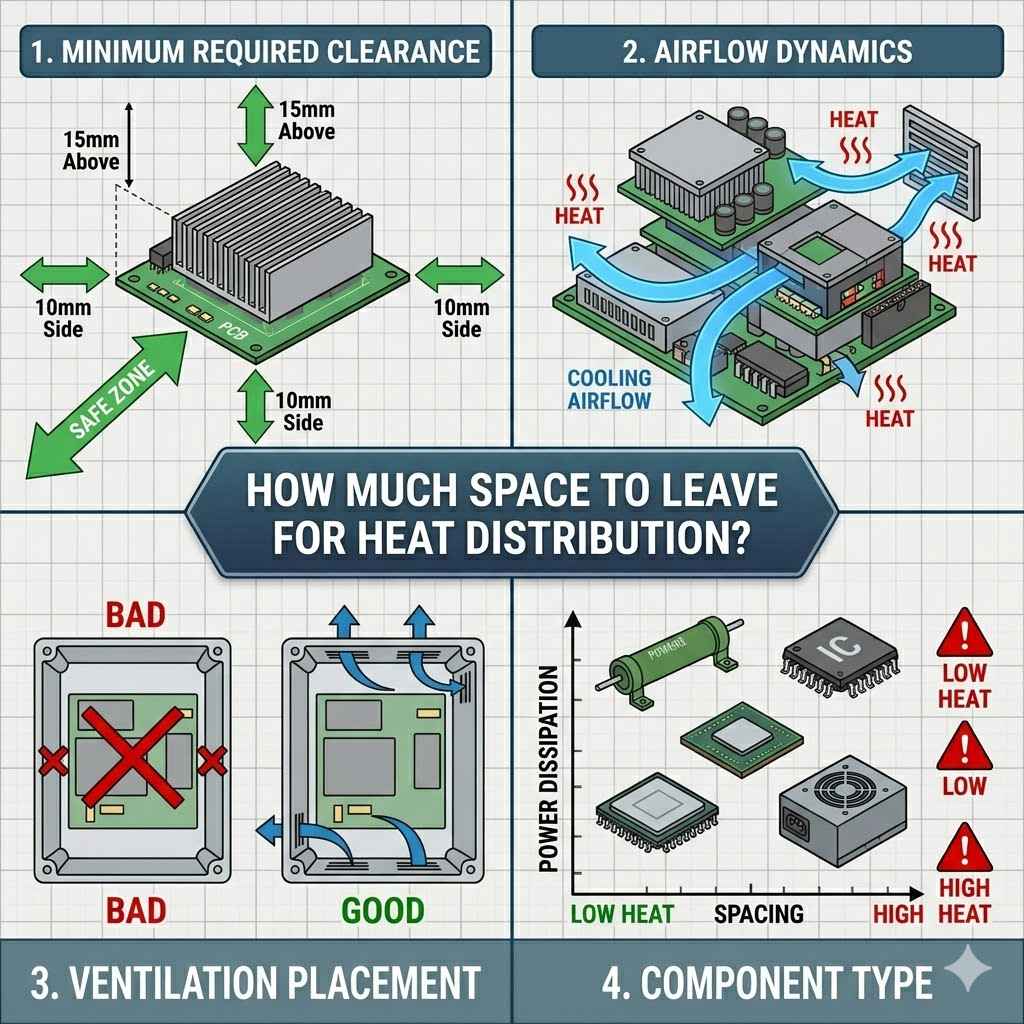
First, look at the component itself. Does it have vents? Where are they? Are there fans? Are they on the side, back, or top? This tells you where the air needs to go.
Second, consider the power rating. Higher wattage components generally produce more heat. A small Wi-Fi router uses much less power than a large home theater receiver.
Third, think about the environment. Is the component in an open room? Or is it packed inside a cabinet? Is the room usually warm or cool?
A general rule of thumb is to allow at least 1 to 3 inches of clear space around all sides of a component that has vents or fans. For very high-power devices or those in enclosed spaces, you might need more. Think 4-6 inches, or even more if it’s a critical piece of equipment.
Quick-Scan Table: Component Space Guide
| Component Type | Typical Space Needed (Clearance) | Notes |
| Wi-Fi Router/Modem | 1-2 inches | Ensure vents aren’t blocked by other items. |
| AV Receiver | 3-6 inches | Top and sides are critical for heat exhaust. |
| Desktop Computer (Tower) | 4-8 inches | Front intake and rear exhaust are key. |
| Game Console | 2-4 inches | Often placed in cabinets; check manufacturer specs. |
| Small Appliance (e.g., Toaster Oven) | 2-3 inches | Depends on heating elements and motor. |
Common Mistakes People Make
One of the most common mistakes is putting electronics in tight cabinets or entertainment centers without thinking about airflow. We want things to look tidy, so we push them back. We stack things too close together.
Another mistake is not cleaning. Dust builds up on vents and fans. It acts like insulation. It makes it harder for air to get through. This can choke off the airflow and make things hotter.
People also sometimes put heat-producing items too close to each other. For example, putting a gaming console right next to a hot router, or stacking multiple receivers on top of each other without space. Each unit needs its own breathing room.
Finally, forgetting about the environment. Putting a sensitive piece of electronics in a hot, stuffy closet is a recipe for disaster. It’s like expecting a car engine to run perfectly in the desert without a good cooling system.
Ensuring Safety in Your Home
Safety is the biggest reason for understanding heat distribution. Overheated electrical components can cause a lot of problems.
The most serious is a fire. Electrical fires are dangerous and can spread quickly. They often start from faulty wiring or components that have overheated due to lack of space.
Beyond fires, overheating can damage the equipment itself. It shortens the lifespan of the components. It can cause them to malfunction. This means more repair costs or needing to buy new items sooner.
It can also be a safety risk for people. If a piece of equipment gets extremely hot, touching it can cause burns. This is especially a concern in homes with children or pets.
Leaving enough space is a simple, inexpensive way to prevent these issues. It’s a fundamental aspect of electrical safety.
Myth vs. Reality: Heat and Electronics
Myth: If it doesn’t smell like burning, it’s okay.
Reality: Components can overheat and degrade long before they produce a burning smell. Damage is occurring silently.
Myth: More space means less efficiency.
Reality: Proper spacing ensures optimal performance and longevity, making systems more efficient and reliable in the long run.
Myth: Modern electronics don’t overheat.
Reality: All electrical components generate heat. Modern ones might be more efficient, but high performance still means significant heat output.
When to Be Concerned and What to Check
How do you know if you don’t have enough space? There are signs. The most obvious is if a component feels excessively hot to the touch. If it’s hot enough that you can’t comfortably leave your hand on it for more than a few seconds, that’s a warning.
Another sign is if the device starts acting strangely. Computers might slow down dramatically. Audio equipment might cut out or make strange noises. Routers might drop Wi-Fi connections. These can be signs of overheating causing performance issues.
Listen for fans. If a fan is running constantly at high speed, it’s working hard to cool something down. If it’s trying to cool a component that’s packed in a tight space, it will run non-stop.
Visually inspect the vents. Are they clear of dust? Can you see airflow coming out of them? If the vents are covered in dust or seem blocked, you have a problem.
Practical Tips for Better Heat Distribution
1. Read the Manual: Always start with the manufacturer’s instructions. They are the experts.
2. Give It Room: For most electronics, aim for at least 1-3 inches of clear space around vents and fans. High-power items may need more.
3. Avoid Tight Cabinets: If you must use a cabinet, ensure it has ample ventilation. Consider adding small fans to improve airflow.
4. Don’t Stack: Avoid placing heat-producing devices directly on top of each other without significant space.
5. Keep Vents Clear: Regularly dust and clean vents and fans. A small brush or compressed air works well.
6. Monitor Temperature: If a device feels too hot, or starts performing poorly, check its ventilation.
7. Consider Your Environment: Don’t put electronics in extremely hot or poorly ventilated areas.
Quick Fixes: Improving Airflow
Problem: Device is too close to back of cabinet.
Fix: Pull the device forward a few inches. Use cable management to keep cords neat.
Problem: Dust clogging vents.
Fix: Gently vacuum or use compressed air to clean vents and fans. Do this regularly.
Problem: Cabinet is like an oven.
Fix: Install small, low-noise computer fans to push cool air in and hot air out.
Frequently Asked Questions
How much space do I need behind my TV?
Generally, 2-3 inches of space behind a TV is good for airflow. The main heat is usually from the back panel. Wall-mounting can affect this; ensure the mount allows for clearance and air movement.
Can I stack my router and modem?
It’s usually best not to stack them directly. Both can get warm. If you must stack, ensure there’s at least an inch or two of space between them, and that neither’s vents are blocked by the other.
My computer is making a loud fan noise. What does that mean?
A loud fan often means the computer’s internal temperature is high. This could be due to the computer working hard, or it could mean airflow is restricted. Check that the computer’s vents are not blocked and that they are clean of dust.
Is it okay to put my game console in an entertainment center cabinet?
Yes, but only if the cabinet is well-ventilated. Many game consoles have vents on the sides and back. Ensure there’s at least 2-3 inches of space around these vents.
Some people add small fans to these cabinets.
What happens if an electrical component overheats?
Overheating can cause components to fail prematurely, reduce performance, or even cause permanent damage. In the worst cases, it can be a fire hazard. Proper spacing helps prevent this.
How often should I clean my electronics’ vents?
It depends on your environment. In a dusty home, you might need to clean vents every 3-6 months. If you have pets that shed, you might need to do it more often.
Look for dust buildup.
The Big Safety and Longevity
Making sure electrical components have enough space for heat distribution is a simple yet powerful step. It’s not complicated, but it’s often overlooked. It directly impacts the safety of your home and the lifespan of your valuable electronics.
By understanding how heat is generated and how air helps to remove it, you can make smarter choices. Always refer to manufacturer guidelines. Give your devices room to breathe. Regularly clean their vents. These actions go a long way. They help prevent problems before they start. This saves you money and keeps your home safer.
Sponsored / affiliate links. As an Amazon Associate I earn from qualifying purchases. I may earn additional commission from eligible campaigns.