Are Smart LED Bulbs Worth It for Homeowners?
Smart LED bulbs make sense when you want room-by-room control, schedules, or color changes and can justify paying about $10 to $30 more per bulb than a standard LED; for whole-room switching, a smart switch usually wins. Ignore the match between bulb and room, and you may spend more upfront, lose app reliability, or buy bulbs that a cheaper wall control would replace. This guide shows the break-even point, compatibility checks, and when to choose smart bulbs, a switch, or plain LEDs.
Verdict

For most homeowners, the best fit is a few smart bulbs in places where lighting mood changes often and manual switching gets annoying. That usually means bedrooms, living rooms, and a home office, not every ceiling fixture in the house. If your main goal is simple on-off control for an entire room, a smart switch is often the better buy.
Specs at a glance
| Buy factor | What to check | Why it matters |
|---|---|---|
| Connectivity | Wi-Fi, Bluetooth, Zigbee, or Thread | Determines setup method, range, and whether a hub or bridge is needed |
| Brightness | 450 lm, 800 lm, 1,100 lm, or 1,600 lm | Use 450 lm for a 40W equivalent, 800 lm for 60W, 1,100 lm for 75W, and 1,600 lm for 100W |
| Light quality | Warm-to-cool white range, dimming, color scenes | Warmer tones feel cozier; cooler tones suit task lighting |
| Platform support | Amazon Alexa, Google Home, Apple Home/Siri Shortcuts, Samsung SmartThings | Prevents app mismatch and makes voice control or automations work |
| Fixture fit | Base size, bulb shape, enclosed fixture clearance | Wrong fit can block installation or shorten life in tight fixtures |
Who it
Smart bulbs make sense for homeowners who want flexible lighting in a few high-use rooms, especially if they already use a smart speaker or hub. They are also a practical upgrade for renters, because you can screw them in and take them with you later. They are less useful for rooms that only need basic on-off control.
Say your bedroom lamp gets used every night and you like a warm tone for winding down, then a cooler, brighter setting for reading. A smart bulb fits that pattern well. If the same room has four ceiling cans and one wall switch, a smart switch may cover the whole room with less complexity.
Smart bulb specs at a glance
Smart LED bulbs are LED-based and may connect by Wi-Fi, Bluetooth, Zigbee, or Thread. You can control them remotely from a smartphone or voice assistant, and many models add dimming, color changes, schedules, scenes, and automations. Those are the features homeowners actually pay for; the bulb itself is still just an LED light source.
Lumens matter more than bulb wattage. A common benchmark is 450 lumens for a 40W equivalent, 800 lumens for 60W, 1,100 lumens for 75W, and 1,600 lumens for 100W. Color temperature matters too: warmer tones feel cozier, while cooler tones are better for task lighting and daytime focus.
Compatibility matters as much as brightness. Philips Hue works with Alexa, Google, and Apple Home. Wyze works with Alexa and Google Assistant. Cync works with Alexa and Google and does not require a hub or bridge. If your home already leans on one ecosystem, that can simplify setup and daily use.
Connectivity types and what they change
Direct Wi-Fi is the easiest path for many homes, but it depends on router range and can add more devices to the network. Bluetooth can be simple for one room or a small setup, though it usually gives less flexible remote access. Zigbee and Thread often fit better in larger smart homes because they can improve range through a mesh network.
Some bulbs use a hub or bridge, which adds cost and another box to manage. That extra step can be worth it if you want stable coverage across a larger home or a more established smart home ecosystem. If you only need a few lamps near the router, direct Wi-Fi may be enough.
Smart bulb decision table
This table uses a simple homeowner break-even view. High usage hours, scene control, and ecosystem fit push the value toward smart bulbs. Low-use spaces, one-switch rooms, or fixtures with fit problems push you toward a smart switch or plain LED bulb.
| Room | Installation ease | Expected usage hours | Need for scenes or automation | Compatibility risk | Recommendation |
|---|---|---|---|---|---|
| Entryway | Easy if the lamp uses a standard socket | Low to moderate | Low unless you want auto-on at sunset | Medium, because outdoor-adjacent fixtures can be a poor fit | Buy smart switch if it controls the whole space; otherwise skip it |
| Bedroom | Easy for bedside lamps | Moderate to high | High for dimming, warm tones, and schedules | Low for standard lamps, higher for enclosed ceiling fixtures | Buy smart bulb |
| Living room | Easy for table lamps; mixed for ceiling fixtures | High | High for movie, reading, and guest scenes | Medium if several bulbs must match and stay synced | Buy smart bulb for lamps; smart switch for ceiling groups |
| Porch | Varies; outdoor use is a check-first case | Low to moderate | Low to moderate | High, because some bulbs are not suitable outdoors or in humid locations | Buy smart switch if the fixture allows it; otherwise skip it |
| Rental unit | Very easy for portable lamps | Moderate | Moderate if you want removable upgrades | Low for lamps, medium for built-in fixtures | Buy smart bulb |
| Home office | Easy for desk lamps | High | High for task lighting and schedule changes | Low to medium | Buy smart bulb |
Who should buy smart LED bulbs?
Smart LED bulbs fit homeowners who care about light quality, not just on-off control. They are most useful when you want dimming, warm-to-cool white tuning, scenes, or app-based schedules in a room that gets used often. They also make sense if you already own an Alexa speaker, Google Home device, Apple Home setup, or SmartThings hub.
Renters are another strong fit, because a bulb upgrade is removable and does not require rewiring. Buyers who only need one light to turn on at a set time can often skip the smart bulb and buy a simpler control instead. The more the room depends on mood changes, the better the case for a smart bulb.
Are they worth the extra cost?
They are worth the premium when the room gets enough daily use to justify paying more for control, not energy savings alone. Smart bulbs usually cost more upfront than standard LED bulbs, and some systems add a hub or bridge. The premium can still feel reasonable if one bulb replaces repeated manual adjustments, bedside fumbling, or a lamp you often dim.
The break-even point is easiest to see by room. In a bedroom or office, a bulb used every day can earn its keep through convenience quickly. In a porch light or guest room, where the bulb stays on less often, the premium is harder to recover. Energy savings do not usually close the gap by themselves, because the bulb is already an LED.
Do smart light bulbs use more electricity? Usually only a little, and the difference is often small compared with the light output itself. The smart feature adds some power draw, but the main efficiency story is still the LED base. A smart bulb is not a money-saving shortcut over a plain LED unless you actually use the scheduling or dimming to reduce runtime.
Compared with a standard LED, a smart bulb often adds a noticeable premium per socket. Pack pricing can reduce the hit, but the math still matters if you need several bulbs at once. If a room has six matching ceiling bulbs, the bill climbs fast, which is one reason a smart switch can be the better whole-room buy.
Break-even by usage hours
High-use rooms get the best value because the convenience is repeated every day. Bedroom lamps, office task lights, and living room lamps are stronger candidates than occasional decorative fixtures. If you rarely touch a room’s lighting, the premium is harder to justify, even if the bulb has good app features.
When energy savings matter and when they do not
Energy savings matter most when you are replacing older, less efficient bulbs with LEDs and then using schedules to keep them off when you do not need them. They matter less when the room already uses plain LED bulbs and your only change is adding app control. In that case, the main benefit is convenience.
What works
Smart bulbs do three things well: they let you control lights from a phone or voice assistant, they adjust brightness and color temperature, and they support schedules and scenes. That combination is useful in rooms where one setting does not fit every activity. It is also why smart bulbs can create a home-theater feel or candle-like warmth.
For a living room, that can mean one scene for TV night, another for reading, and a brighter setting for cleaning. In a home office, it can mean cooler light for focused work and warmer light later in the day. The right bulb can also reduce the need to walk across a dark room just to change a lamp.
Picture a 60W-equivalent bedside lamp with an 800 lm bulb. If you want a warm glow at 10 p.m. and a brighter, cooler setting before sunrise, a smart bulb handles both without swapping hardware. That is the kind of use case where the premium earns its place.
Pros
- Easy room-by-room control from an app or voice assistant
- Useful dimming, schedules, scenes, and automations
- Good fit for bedrooms, living rooms, and offices
- Can work with Alexa, Google Home, Apple Home, or SmartThings, depending on the model
Cons
- Higher upfront cost than standard LED bulbs
- Some models need a hub or bridge
- Compatibility problems can show up with dimmers, enclosed fixtures, or outdoor use
- Whole-room control is often better handled by a smart switch
What does not?
Smart bulbs are not a universal upgrade. They are a poor match for fixtures with incompatible dimmers, tight enclosed housings, or outdoor locations that the bulb is not rated for. They can also be a weak choice when your router signal is unreliable where the fixture sits.
Another common failure case is overbuying features. If you just need one light to turn on and off, paying for app control can be wasteful. Suppose a dining room has four ceiling bulbs tied to one wall switch. In that case, a smart switch can control the whole room more cleanly than four separate bulbs.
Do smart bulbs work with any lamp? No. You need the right base size, the right bulb shape, enough clearance inside the fixture, and a location the bulb is rated for. Enclosed fixtures can trap heat, and some bulbs may not be suitable outdoors or in humid locations.
When a smart switch is the better buy
A smart switch is the better buy when you want the entire room to respond together. It usually makes more sense for ceiling fixtures, multi-bulb lights, and spaces where every bulb should always behave the same way. If the real goal is wall-level control, not bulb-level customization, the switch wins on simplicity.
That is especially true for hallways, kitchens with several cans, and large living rooms with one wall control. You avoid the need to buy multiple smart bulbs, keep them all paired, and deal with mismatched brightness or color settings. For many owners, that is the cleaner setup.
Use a smart switch when…
- You want one control for several bulbs at once.
- The room does not need scenes or color changes.
- You want lower cost per room, not per bulb.
- The fixture is hard to reach or uses enclosed cans.
- You want fewer app-managed devices on the network.
Alternatives

Cync GE A19 LED Smart Light Bulbs are the budget-leaning option here at $19.99 for a 2-pack. Based on the published product details, they offer millions of color options, schedules, and no hub or bridge requirement. The tradeoff is platform support that stops at Alexa and Google, so Apple Home buyers should look elsewhere.
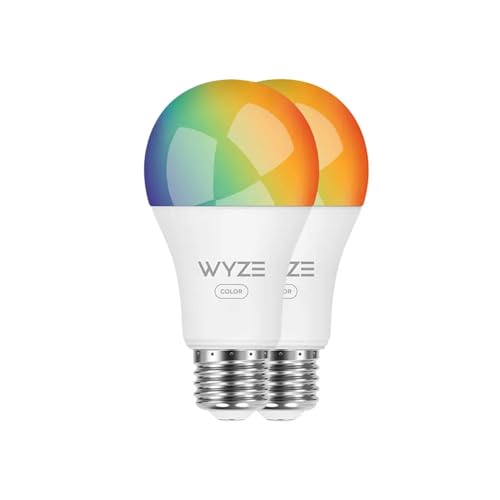
Wyze Bulb Color is a strong pick if you want a brighter 1,100-lumen smart bulb pair for task lighting. The A19 form, tunable white, and RGB color make it useful in a desk or living room lamp. The drawback is ecosystem support: it works with Alexa and Google Assistant, but not Apple Home.
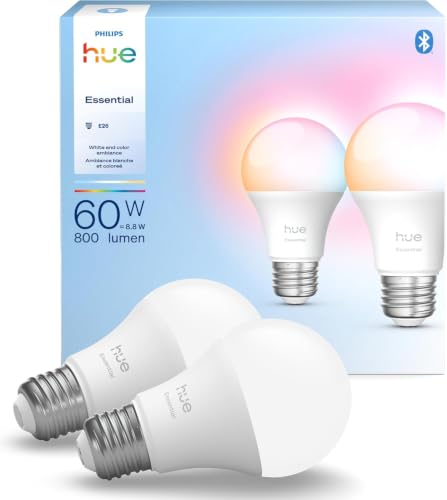
Philips Hue Essential Smart LED A19 Bulb is the broadest compatibility choice in this group, since it works with Alexa, Google, and Apple Home. It also offers millions of colors, preset scenes, and smooth dimming from 100% to 2%. The main drawback is cost: at $37.99 for a 2-pack, it sits higher than the other options listed here.
Should you buy it?
Buy smart LED bulbs when the room benefits from dimming, scheduling, or color changes often enough to justify the premium. Start with lamps and high-use spaces first. Skip them in rooms where a plain LED already does the job, and choose a smart switch when you want whole-room control with less hassle.
A practical order of operations helps. Check the fixture, then the ecosystem, then the brightness you need. If those line up, a smart bulb can be a good upgrade. If any one of those fails, the cheaper or simpler option is usually the better decision.
Frequently asked questions
Do smart light bulbs use more electricity?
Usually, but only slightly. The smart electronics add some power draw, yet the bulb is still LED-based, so the big electricity savings come from LED efficiency, not from the smart features. If you never use schedules or dimming, the difference versus a plain LED is often too small to matter much.
Are smart bulbs energy efficient?
They can be, because they use LED technology. Compared with plain LED bulbs, though, the energy advantage is not the smart part itself. The most meaningful savings come when you use scheduling, dimming, or automation to keep lights on only when needed. That matters more than voice control alone.
Do smart bulbs work with any lamp?
No. You need the correct base size, a compatible bulb shape, enough room inside the fixture, and a location the bulb is rated for. Enclosed fixtures can trap heat, and some bulbs are not suitable outdoors or in humid locations. Check the fixture first, then the bulb.
How do I choose smart light bulbs?
Start with the room and the control you want. Match brightness to the space using lumens, choose warm or cool white based on the mood or task, and confirm support for Alexa, Google Home, Apple Home, or SmartThings if you already use one. Also check whether the bulb needs Wi-Fi, Zigbee, or Thread.
Are smart bulbs safe?
They are generally safe when used within their listed fixture limits and installed in compatible sockets. The main risks are fit and heat, not the fact that they are smart. Avoid putting a bulb into an enclosed fixture or outdoor location unless the manufacturer says it is rated for that use.
How much do smart LED bulbs cost?
Prices vary by brand, color support, and ecosystem. The examples here show a 2-pack at $19.99, another at $31.97, and a third at $37.99. That range illustrates the premium over standard LED bulbs. Some systems also add hub or bridge costs, which raises the total.
Sponsored / affiliate links. As an Amazon Associate I earn from qualifying purchases. I may earn additional commission from eligible campaigns.