Best Smart Bulbs for Multi-switch Rooms (2026): We Compared
For rooms with multiple wall switches, the best smart bulbs stay powered all the time and keep app, voice, and schedule control available. If any switch can cut power, choose a smart switch or relay instead. That rule matters more than brand, color, or platform support.
Quick comparison
| Product | Badge | Best for | Price | ||
|---|---|---|---|---|---|
 |
Philips Hue Essential Smart LED A19 Bulb, White and ColorPhilips Hue | Our pick | A19 · color ambiance · 2-pack | $37.99
Price as of 26 Oct 2026
|
View |
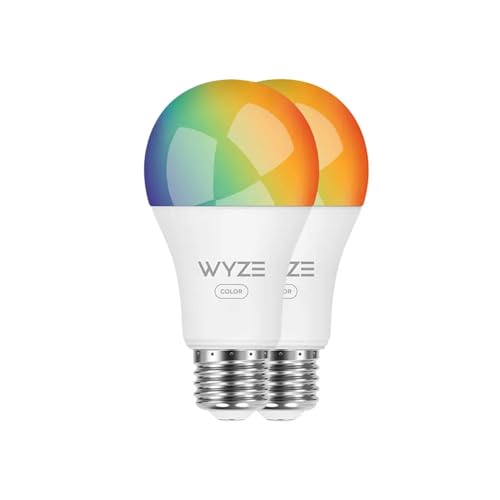 |
Wyze Bulb Color, 1100 Lumen WiFi RGB and Tunable White A19WYZE | Budget pick | A19 · color · 2-pack | $31.97
Price as of 26 Oct 2026
|
View |
 |
Cync GE A19 LED Smart Light Bulbs, Room Decor AestheticCync | Also great | A19 · color changing · 2-pack | $19.99
Price as of 26 Oct 2026
|
View |
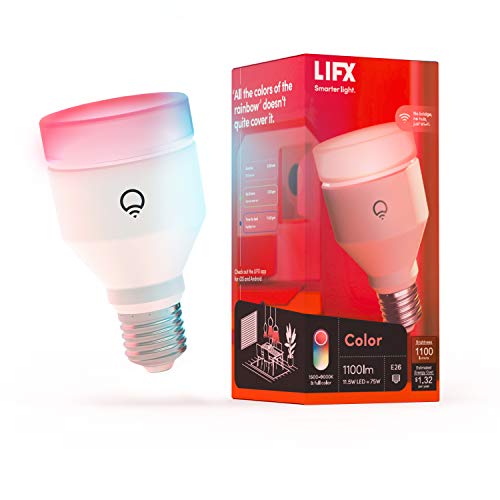 |
LIFX LED Light Bulb Color 1100 Lumens – WiFi Smart, AlexaLIFX | Upgrade pick | A19 · 1100 lumens · tunable white | $24.96
Price as of 26 Oct 2026
|
View |
 |
Sengled Smart Bulb, WiFi Light Bulbs, Dimmable Alexa LightSengled | Pair with it | A19 · soft white · 1 pack | $9.99
Price as of 26 Oct 2026
|
View |
The core trade-off is simple: a smart bulb gives you room-level lighting control from the fixture, while a smart switch gives you wall-level power control from the switch box. In a room with more than one wall switch, wall control usually wins unless every controlling switch can stay on.
Use smart bulbs where the fixture keeps constant power. Use smart switches where a three-way or four-way layout can cut power from more than one location.
How we chose
We compared each bulb on four points that matter in multi-switch rooms: whether it stays reachable when the wall switch is left on, which platforms it supports, how much brightness it provides, and whether the bulb shape and base are likely to fit the fixture.
We also looked at protocol options, because Wi-Fi, Zigbee, Bluetooth, and Matter change setup friction and recovery after a power loss. Finally, we gave extra weight to cases where a smart switch is the safer answer.
What breaks smart bulb control in multi-switch rooms?
Smart bulbs only work as smart lights when the fixture keeps constant power. If any wall switch in the control path turns off, the bulb can go offline, app control stops, voice commands fail, and schedules cannot fire until power returns.
Single-pole versus three-way and four-way wiring
A single-pole room has one switch controlling one light. That is the easiest fit for a smart bulb, because you can leave the switch on and control the bulb through an app, voice assistant, or routine.
Three-way and four-way rooms are different. One fixture may be controlled from two or three switch locations, so any one of those switches can kill power. In those rooms, a smart switch or relay is often the safer choice, because wall-level control stays intact even when the bulb is smart.
Why a switched-off wall cuts app control
If the bulb has no power, it cannot hear a command. That failure mode is the main reason multi-switch rooms cause trouble: the bulb is fine, but the wall path is not. Matter, Alexa, Google Home, Apple Home, or SmartThings cannot fix a dead circuit.
Say your hallway has a switch at each end and one of them gets turned off during cleaning. The lights may still look “smart,” but they are unreachable until someone restores power at the wall.
Fixtures, lamps, and mixed bulb counts
Fixtures matter too. Enclosed shades, odd bulb shapes, and mixed bulb counts can limit fit and change how much heat the bulb can handle. An A19 bulb with an E26 base is the most common starting point, but it is not universal.
A room can also mix fixture types. A ceiling light on switches may need a smart switch, while table lamps on plugs can use smart bulbs or smart plugs. That hybrid setup often works better than forcing every light in the room into one control method.
Kasa smart bulb: best for simple Wi-Fi setups
This is for a straightforward retrofit where the fixture can stay powered and you want a bright Wi-Fi bulb with broad app control. The listed model is an A19, E26, 1100-lumen bulb with Alexa, Apple Home, and Google support in the product details.
What stands out is the combination of 2.4 GHz Wi-Fi compatibility, tunable white, and voice-platform support without a hub requirement. That makes it a practical fit for a bedroom lamp, a single-switch ceiling fixture, or any room where the switch stays on.
The drawback is the same one that affects most Wi-Fi bulbs: if the wall switch is off, the bulb drops out of reach. Range also depends on router coverage, so the bulb is only as reliable as the network in that room.
Who this fits
Choose this kind of bulb for a simple room with one switch, a lamp that stays plugged in, or a homeowner who wants direct Wi-Fi control with minimal setup. It is also a sensible pick for rooms where brightness matters more than color effects.
What can break control?
Any switch that removes power. A three-way hallway or stairwell can cut control from one end, and a four-way run can be worse. If you cannot guarantee constant power, the bulb is the wrong control point.
Minimum compatibility to check
Check for 2.4 GHz Wi-Fi, an E26 base, and a shape that matches the fixture. If you want platform control, confirm the bulb works with Alexa, Google Home, or Apple Home before you buy. Direct Apple Home support is better than app-only control if you plan to use Siri and the Home app.
Philips Hue bulb: best for multi-room platform support
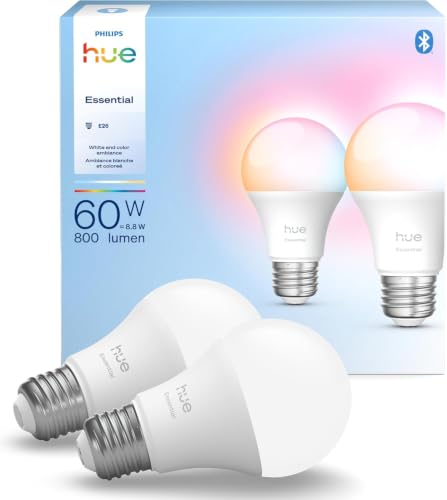
This is the better choice when you want one bulb family that can sit inside a larger mixed system. The listed bulb is an A19, E26, 800-lumen, dimmable color bulb with Alexa, Google, and Apple Home support.
What stands out is platform reach. Philips Hue is a strong option for homes that may later add smart switches, scenes, or more bulbs in other rooms. The lower 800-lumen output also fits common bedroom or accent uses where full-room brightness is not the goal.
The drawback is cost. A two-pack like this can be a harder sell for a simple room where you only need one bulb and no advanced scene system. It is also not a cure for a switch that cuts power.
Bridge, matter, and Apple Home support
Hue bulbs are known for broad ecosystem support, and this model’s listed Apple Home, Google, and Alexa compatibility makes that easier. Matter support can reduce platform lock-in across supported systems, but it does not change the need for constant power at the fixture.
For Apple Home users, direct support matters. It lets you use Siri and the Home app without depending on a separate vendor app for every action.
When Zigbee is the better path
Zigbee can be a better fit when you want a mesh-style setup and already have a compatible hub or bridge. That can help in homes with many lights, because the bulbs talk through the hub instead of depending only on Wi-Fi coverage.
But even with Zigbee, the wall switch problem remains. A disconnected bulb is still disconnected.
Sengled smart bulb: best for budget rooms
This is the budget-minded pick for a room that needs basic voice and app control without a hub. The listed bulb is an A19, 800-lumen, soft white option that works with Alexa and Google Home and adds schedules and wake-up modes.
What stands out is price. For a bedroom, hallway lamp, or guest room where you want simple automation at low cost, this kind of bulb is easy to place in more than one room.
The drawback is narrower platform support than the more expensive options here. It does not list Apple Home in the provided specs, so Apple users may want another model. As with all smart bulbs, it still fails when the switch cuts power.
Brightness and base-size checks
Use 800 lumens as a common stand-in for a standard household bulb. That is usually fine for a bedroom lamp or a smaller ceiling fixture, but it may feel dim in a larger living room unless you use multiple bulbs.
Check the base and shape too. An A19 with an E26 base is common, but recessed trims, enclosed shades, and decorative fixtures can require a different bulb shape.
Do you need smart switches instead?
Often, yes. In a room with three-way or four-way switching, a smart switch is usually the safer answer because it preserves wall-level control without cutting power to the bulb. Smart bulbs can still work there, but only if every switch stays on and the circuit remains reachable.
Three-way and four-way rooms
Three-way and four-way layouts are the main reason to choose switches first. They are common in hallways, stairwells, and large rooms. If someone uses the wall normally, a bulb-only plan can fail the moment one switch is toggled.
F1 smart lighting can control groups of lights on more than one circuit simultaneously, but that does not remove the need to keep the circuit alive. The control system still depends on power reaching the bulb.
When wall-level control matters more than bulb control
If you care most about reliable on-off control from the wall, choose the switch. That is especially true in rooms used by guests, children, or anyone who expects the switch to work like a normal switch. The bulb can be smart later.
The Verge’s view aligns with that split: the most effective setup is likely a mix of smart bulbs and smart switches, not bulbs everywhere.
Hybrid setups that mix bulbs and switches
Hybrid setups are often the best answer. Use smart switches for ceiling fixtures that multiple wall plates control, then use smart bulbs in lamps or in single-switch rooms where constant power is easy to maintain.
A common first-timer mistake is putting smart bulbs in a dining room with two switches, then wondering why scenes stop working. A smart switch on the ceiling light and smart bulbs in side lamps is usually more dependable.
Smart bulbs room decision table

The safest choice depends on the control path, not only the bulb. Use this table to match the room layout to the lighting approach that is least likely to fail.
| Room setup | Recommended bulb type | Is a smart switch safer? | What can break control | Minimum compatibility requirement |
|---|---|---|---|---|
| Single-pole room | Wi-Fi or Matter smart bulb, A19/E26 if the fixture fits | No, usually not needed | Turning the only switch off cuts power | App, voice, or platform support plus constant power |
| Three-way room | Smart bulb only if every switch can stay on | Yes, often safer | Either switch can kill power to the bulb | Control path must stay live from all switch locations |
| Four-way room | Smart bulb only in a fully bypassed circuit | Yes, usually the safer choice | Any one switch can cut power | All wall controls must preserve constant power |
| Lamps on plugs | Wi-Fi, Zigbee, Bluetooth, or Matter bulb in the lamp | No, unless the plug itself is switched | Smart plug or wall switch turning off the outlet | Continuous outlet power and a supported app or voice platform |
| Mixed fixtures in one room | Smart bulbs for lamps, smart switch for ceiling light | Yes, for the ceiling fixture | Different control paths fail separately | Each fixture needs its own compatible control method |
| Renter-friendly no-rewire setup | Smart bulbs with remotes, scenes, or voice control | Only if a smart switch is allowed | Someone flips the wall switch off | Easy restore path plus power that stays on |
Single-pole rooms
These are the easiest places to use smart bulbs. If the switch can stay on and the fixture fits a standard A19/E26 bulb, you can usually choose based on brightness, color, and platform support.
Three-way rooms
These deserve caution. If either switch can cut power, choose a smart switch or a relay unless you can lock both switches on and keep them there. Otherwise, app control will be unreliable.
Four-way rooms
Four-way rooms are the least forgiving. A bulb-only setup can be frustrating because any one switch can interrupt the connection. A wall device that preserves control is the safer path.
Lamps on plugs and renter-friendly no-rewire setups
Plug-in lamps are the best place for smart bulbs in rentals. They avoid rewiring, and the lamp can stay powered as long as the outlet does. IKEA notes that some smart bulbs need a gateway to work through its Home smart app, and it also says you can link up to 10 smart bulbs or light panels with a wireless remote control.
If you cannot touch the wiring, a remote, a hub, or voice control may be the practical middle ground. The key is still the same: do not let the bulb lose power.
Which one should you buy?
Choose the bulb that matches the room’s control path first, then platform support and brightness. For simple Wi-Fi retrofits, the Kasa-style pick is the easiest. For a broader smart home with Apple Home support, the Philips Hue bulb is stronger. For the lowest upfront cost, Sengled is the budget answer.
If the room has more than one wall switch that can cut power, a smart switch is often the better purchase than any bulb on this page. If you need both, mix them: switch for the ceiling fixture, bulbs for lamps or single-switch zones.
Choose Kasa if…
You want a bright A19 bulb for a simple room, you have 2.4 GHz Wi-Fi coverage, and the switch can stay on. It is also a good fit if you want easy voice control without adding a bridge.
Choose Philips Hue if…
You want Apple Home, Google, and Alexa support in a room where the fixture stays powered, and you care about a broader platform path later. It is also a better fit if you expect to expand to more rooms.
Choose Sengled if…
You want the lowest cost and a basic 800-lumen bulb for Alexa or Google. It fits bedrooms, small living spaces, and guest rooms, as long as the wall switch does not cut power.
Frequently asked questions
What smart bulbs work in rooms with two or more switches?
Only bulbs in rooms where the fixture can stay powered all the time are reliable. In a two-switch or three-switch layout, that usually means the switches must be left on permanently or bypassed. If that is not possible, a smart switch is the safer choice.
Can I use smart bulbs if the light is controlled by multiple switches?
Yes, but only if none of those switches can cut power during normal use. If any wall switch turns off the circuit, the bulb can drop offline and app, voice, and schedule control will fail until power is restored.
Do I need smart switches instead of smart bulbs for a room with multiple switches?
Often, yes. Three-way and four-way rooms are where smart switches usually win because they keep wall control working without cutting power to the bulb. Smart bulbs still make sense for lamps or single-switch fixtures inside the same home.
Which smart bulbs work with Apple Home, Google Home, or Alexa?
From the products here, Philips Hue lists Apple Home, Google, and Alexa support, and the Meross bulb in the source notes also supports Apple Home directly as well as Alexa, Google Home, and SmartThings. Direct Apple Home support is better than app-only control if you want Siri and the Home app.
Should I get Matter smart bulbs for a multi-switch room?
Matter can reduce platform lock-in across supported systems, which is useful if you may switch between Apple Home, Google Home, or Alexa later. It does not solve the main multi-switch problem. If the wall cuts power, Matter cannot keep the bulb reachable.
How bright should smart bulbs be for a bedroom or living room?
A common rule of thumb is 450, 800, 1,100, or 1,600 lumens for common incandescent-equivalent needs. Use lower output for lamps and bedrooms, and move higher for larger rooms or task lighting. A single bulb may not be enough in a big living room.
Sponsored / affiliate links. As an Amazon Associate I earn from qualifying purchases. I may earn additional commission from eligible campaigns.