Best Smart Light Switches for Older Homes: We Compared
For older homes, the best smart light switch is the one that matches your wiring: choose a neutral-required model only if the box has a neutral, otherwise buy a no-neutral switch or a hub-based option. Ignoring that can mean flicker, Wi-Fi dropouts, or a switch that cannot be installed safely. Check the box first, then choose the ecosystem and model.
Quick picks
- Best overall for older homes: Lutron Caseta Smart Start Kit. It is the top pick here because it combines strong ecosystem support, a bridge that connects directly to your router, and a setup that fits many legacy wiring situations.
- Best budget pick: TP-Link Kasa Smart Light Switch HS200. It is the lowest-cost option in this guide, but it requires a neutral wire.
- Best for HomeKit: Lutron Caseta Smart Start Kit. Apple HomeKit compatibility is harder to find than Alexa or Google support, so this is the safer first check.
- Best for Alexa and Google Assistant: TP-Link Kasa HS200 if you have a neutral wire and want a low price; Lutron Caseta if you want a broader system with a hub.
Quick comparison
| Product | Badge | Best for | Price | ||
|---|---|---|---|---|---|
 |
Lutron Caseta 3-Way Smart Dimmer Kit; LED Dimmer, WirelessLutron | Our pick | Smart dimmer kit · no neutral · 3-way | $74.95
Price as of 25 Oct 2026
|
View |
 |
Kasa Smart Dimmer Switch HS220, Single Pole, Needs NeutralKasa Smart | Pair with it | Smart dimmer switch · neutral required · single-pole | $19.99
Price as of 25 Oct 2026
|
View |
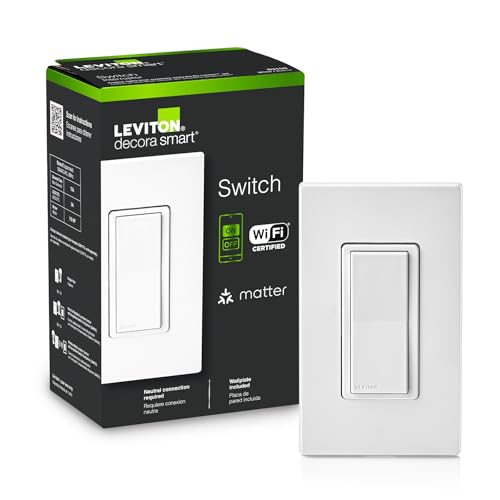 |
Leviton Decora Smart Switch, Wi-Fi, D315S-1RW, White |Leviton | Also great | Wi-Fi smart switch · neutral required · 3-way | $39.00
Price as of 25 Oct 2026
|
View |
 |
GE CYNC Smart Paddle Light Switch, Wi-Fi & Bluetooth, 1Cync | Budget pick | Smart paddle switch · no neutral · single-pole | $22.99
Price as of 25 Oct 2026
|
View |
 |
Lutron Caseta Diva Smart Dimmer Switch (Smart HubLutron | Upgrade pick | Smart dimmer switch · no neutral · 3-way | $139.90
Price as of 25 Oct 2026
|
View |
Start with wiring, not features. Check neutral wire presence, box depth, and whether your circuit is single-pole or 3-way before you compare voice control or app extras.
How we chose
We compared switches on wiring fit first, then on ecosystem support, hub needs, and whether each option makes sense for older homes with mixed wiring generations. We also looked at dimming support, 1-way versus 3-way compatibility, and how much installation complexity each model adds.
Two things mattered most. First, whether the switch can actually fit the box and circuit you have. Second, whether the ecosystem support matches the platform you already use, especially Apple HomeKit, Amazon Alexa, or Google Assistant.
Older-home fit check table
| Wire count | Neutral present | Box depth | 1-way vs 3-way circuit | Dimming need | Hub needed | Compatible ecosystems | Pass/fail recommendation |
|---|---|---|---|---|---|---|---|
| 2 wires plus ground | No | Shallow | 1-way | No | No | Limited no-neutral models; verify Alexa or Google support | Fail for neutral-required switches. Consider a no-neutral model or smart bulbs instead. |
| 3 wires plus ground | Yes | Deep enough for device body and wire fold-back | 1-way | No | No or yes | Alexa, Google Assistant, sometimes HomeKit | Pass. This is the easiest older-home scenario for most smart switches. |
| 3 wires plus ground | Yes | Shallow | 3-way | Yes | Maybe | Depends on the model; verify before purchase | Borderline pass. Buy only if the switch is rated for 3-way use and fits the box depth. |
| 2 wires plus ground | No | Standard | 3-way | Yes | Often | Platform support varies | Fail for most neutral-required switches. A hub-based or no-neutral 3-way solution is safer. |
| Mixed legacy wiring | Unknown | Unknown | Multi-way or mixed | Yes or no | Depends | Must be checked case by case | Needs inspection. Open the box, identify conductors, and confirm the exact circuit type before buying. |
How to choose
Start with the neutral wire. Many smart switches require one, and older homes often lack it at the switch box even when modern homes usually have it. If the box has only hot, load, and ground, a neutral-required model is usually the wrong buy.
Next, match the circuit. A single-pole switch controls one light from one location. A 3-way circuit controls the same light from two locations. If you buy a single-pole switch for a 3-way setup, installation can fail or the switch can behave unpredictably.
Then check the load. Dimmers need bulb and fixture compatibility, and some LED loads do better with a switch specifically rated for LED dimming. In older homes, mixed lamp types can create flicker or a narrow dimming range if the switch and load do not match.
Finally, decide whether you want a hub. A smart bridge or hub can add stability and expand the device ecosystem. Some systems connect through a bridge that then connects directly to the router. That is often easier to manage than piling more Wi-Fi devices onto a crowded network.
Say your hallway has a shallow metal box, a 3-way circuit, and no neutral wire. A neutral-required Wi-Fi switch will not be the right fit, even if the app looks appealing. In that case, a no-neutral or hub-based option is the safer route.
Suppose your dining room has a neutral wire but two types of LED bulbs on the same dimmer. The switch may install fine, but the load mix can still cause buzzing, flicker, or poor low-end dimming. Matching the dimmer to the lamps matters as much as the wiring.
Lutron Caseta Smart Start Kit: best for older homes
This is the best overall pick for older homes because it combines broad ecosystem support with a bridge-based setup that can be easier to manage in legacy wiring situations. The kit includes a smart bridge, dimmer switch, 3-button remote, and wall plate bracket, and it works with Amazon Alexa, Apple HomeKit, Google Assistant, and Ring.
It is a strong choice if you want a system that can scale. The Lutron system supports up to 50 Lutron devices, and the bridge connects directly to your router. That makes it a practical fit when you want a more stable control layer than a purely Wi-Fi-only setup.
The drawback is cost and system complexity. You are buying into a larger ecosystem, and not every older-home wiring problem disappears just because the bridge is good. If you only need one basic switch, this may be more system than you need.
TP-Link Kasa Smart Light Switch HS200: best budget pick
This is the budget pick for shoppers who want a straightforward smart switch without paying for a bridge. It does not need a hub, works with Amazon Alexa and Google Assistant, and fits well when you have a neutral wire already in the box.
Its main appeal is price and simplicity. For a homeowner who wants app control and voice control without extra hardware, it is a clean entry point. The neutral wire requirement is the key check, though, and that rules it out for many older homes.
The downside is narrow compatibility. It does not offer the same ecosystem breadth as the Lutron option, and it is not the right first choice if you need Apple HomeKit support or a no-neutral install.
Lutron Caseta Diva Smart Dimmer Switch: best for no-neutral dimming
This is the better fit when you need dimming and your box does not have a neutral wire. It works with Alexa, Apple Home, and Google Assistant, and the no-neutral design makes it especially useful in older homes that were wired before smart controls were common.
It also gives you a more refined dimming control than a simple on-off switch. That matters when you want room lighting to feel more natural rather than binary.
The tradeoff is that it still belongs to the Caseta system, so you are buying into a hub-based ecosystem. That can be a plus for stability, but it adds cost and another device to the setup.
Kasa Smart Dimmer Switch HS220: best for neutral-wire dimming

This is a low-cost dimmer for homes that already have a neutral wire and want Alexa or Google Assistant support. It is a single-pole switch, requires a neutral wire, and does not need a hub.
It suits buyers who want dimming without stepping into a larger bridge system. The app-guided setup and scheduling features are useful for routine lighting control, and the price is hard to ignore.
The drawback is the same one that limits many budget switches in older homes: neutral requirement and single-pole-only support. If your wiring is older, shallow, or 3-way, confirm compatibility before buying.
Leviton Decora Smart Switch: best for mixed ecosystems
This is a strong option if you want a switch that works across multiple platforms, including Matter, My Leviton, Alexa, Google Assistant, and Apple Home/Siri. It also supports wired or wire-free 3-way use, which gives it flexibility in homes with multi-location control.
That flexibility is useful in older houses where circuits vary from room to room. If you want one platform-agnostic switch family for several rooms, this model is worth a look.
The drawback is that it still requires a neutral wire. It is not the best answer for boxes that lack a neutral, and its broader compatibility does not remove the need to verify the wall wiring first.
GE CYNC Smart Paddle Light Switch: best no-neutral Wi-Fi option
This switch is worth considering when you need a no-neutral model and want Alexa or Google Home compatibility. It uses Wi-Fi and Bluetooth, supports single-pole install, and does not need a hub.
That makes it useful in older homes where the switch box is tight and rewiring is not practical. The built-in wireless setup may also help if you want app control without adding a bridge.
The main limitation is ecosystem breadth. It is not the first choice for HomeKit-focused buyers, and no-neutral switches can still be sensitive to load type and box conditions.
Which one should you buy?
Buy the Lutron Caseta Smart Start Kit if you want the safest all-around choice for older homes and need strong compatibility with Alexa, Apple HomeKit, Google Assistant, or Ring. It is also the better pick if you want a bridge-based setup that can support multiple devices over time.
Buy the TP-Link Kasa HS200 if you have a confirmed neutral wire and want the lowest upfront cost. It is a smart fit for a simple single-pole room where Alexa or Google Assistant is enough.
Buy the Lutron Caseta Diva Smart Dimmer if you need dimming and do not have a neutral wire. That is often the cleanest route in older homes where rewiring the box is not practical.
Choose smart bulbs instead when the switch box is too shallow, the wiring is mixed and unclear, or the circuit setup makes installation risky. Smart bulbs are also easier when you want color control in one lamp rather than whole-room wall control.
How-To Geek notes that some smart switches need a neutral wire installed in most modern homes, and that most smart switches require installation. That is a good reminder that the best buy is not the one with the longest feature list. It is the one that fits your box, your circuit, and your ecosystem.
Smart switch fit check table
| Scenario | Recommended path | Why it fits | Pass/fail |
|---|---|---|---|
| 1-way circuit with neutral wire | Kasa HS200 or Leviton Decora Smart Switch | Both are built for neutral-required installs and cover common voice assistants. | Pass. |
| 1-way circuit without neutral wire | Lutron Caseta Diva Smart Dimmer or another no-neutral model | No-neutral wiring is the key constraint, so the switch must be designed for it. | Pass if the model is rated no-neutral. |
| 3-way circuit with neutral wire | Leviton Decora Smart Switch or a Caseta 3-way solution | Multi-location control needs a switch rated for 3-way use. | Pass with a 3-way-compatible model. |
| Older box with shallow depth | Consider a slimmer no-neutral option or smart bulbs | Extra pigtails, wire nuts, and device body can crowd the box. | Borderline. Fit must be checked before purchase. |
| Need dimming with mixed load types | Lutron Caseta Diva or a dimmer that lists LED compatibility | Dimmers are more sensitive to lamp type than simple on-off switches. | Pass only if the load list matches. |
| Want Alexa, Google, or HomeKit support | Lutron Caseta for broad support; Kasa for Alexa and Google; verify HomeKit on any model | Apple HomeKit is often harder to find than Alexa or Google compatibility. | Pass after ecosystem verification. |
Frequently asked questions
Do smart light switches need a neutral wire in older homes?
Many do, and that is one of the biggest compatibility checks in older homes. Some switches work without a neutral, but you should verify the exact model before buying. If the box lacks a neutral, a no-neutral switch or smart bulbs may be the better fit.
Which smart switch works without a hub?
TP-Link Kasa HS200 and GE CYNC are examples in this guide that do not need a hub. That said, hub-free does not mean universal. You still need to confirm neutral wire status, circuit type, and whether the switch supports your preferred ecosystem.
Can I use a smart light switch with Alexa, Google Home, or HomeKit?
Yes, but support varies by model, and Apple HomeKit compatibility is often harder to find than Alexa or Google support. The Lutron Caseta Smart Start Kit works with all three, while the Kasa HS200 works with Alexa and Google Assistant. Always verify the exact listing before purchase.
Should I choose a smart switch or smart bulbs for an older house?
Choose a smart switch when you want wall control for the whole room and the wiring fits the switch. Choose smart bulbs when the box is shallow, the neutral is missing, or the circuit is too messy to replace cleanly. Smart bulbs are often the easier fix when rewiring is the bad option.
What happens if the internet goes down with a smart switch?
Local control may still work if the switch supports it, but cloud features, remote access, and some automations can stop. Hub-based systems often handle local control more reliably than cloud-dependent setups. If outage behavior matters, check how the app and voice control work offline.
Can an electrician install a smart light switch in an older home?
Yes, and that is often the safer choice when the wiring is unknown, the box is cramped, or the circuit is 3-way and hard to trace. An electrician can identify the neutral, confirm load compatibility, and correct any unsafe or nonstandard wiring before the new switch goes in.
Sponsored / affiliate links. As an Amazon Associate I earn from qualifying purchases. I may earn additional commission from eligible campaigns.